Framer pricing 2026: plans, limits, add-ons and how it compares with Webflow
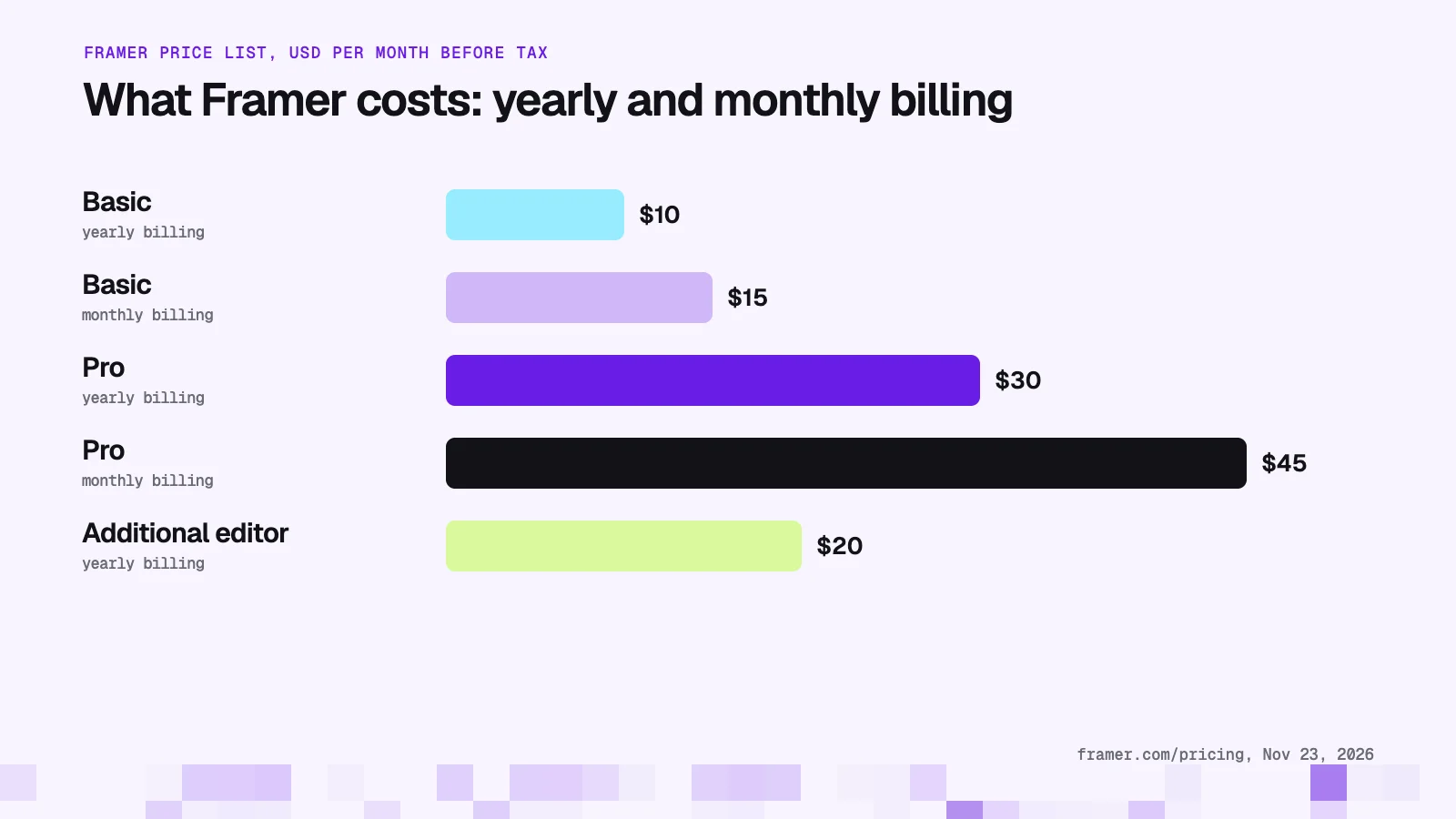
Framer costs $10 a month for the Basic plan and $30 a month for the Pro plan on yearly billing, before tax. On monthly billing the same plans cost $15 and $45. A small site with a blog fits the Basic plan at $120 a year, which is cheaper than Webflow Premium at $300 a year. Once a site needs more than 30 pages, more than two CMS collections, several languages or several editors, the gap narrows or reverses.
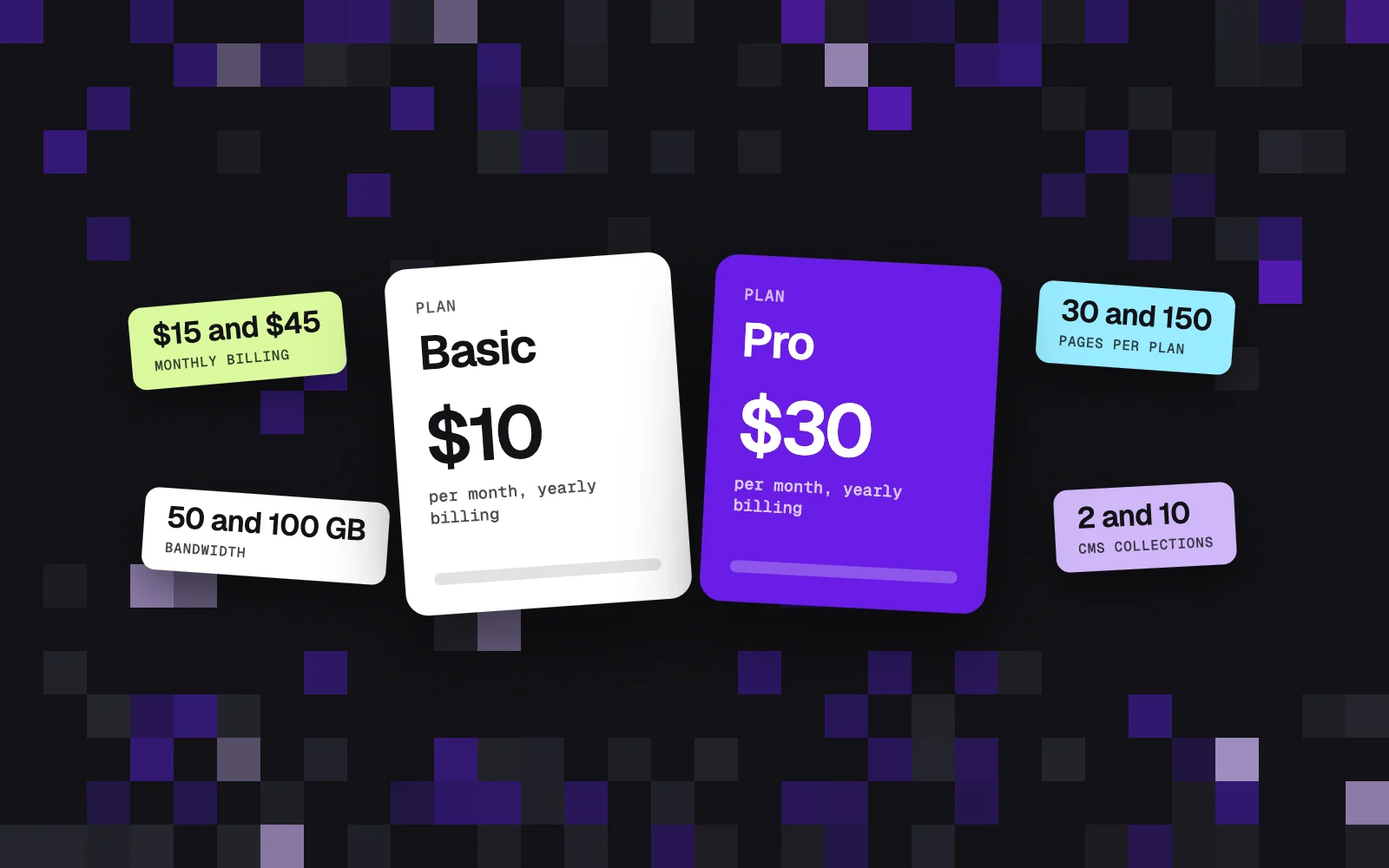
Framer pricing in November 2026 comes down to three plans for a regular website: Free, Basic at $10 and Pro at $30 a month when you pay for a year up front. This article collects the full Framer price list as of November 23, 2026, explains the limits and add-ons, and ends with a 3-year cost calculation next to Webflow.
Framer has changed its pricing twice in the last 14 months. That is why many guides still describe plans that no longer exist: Mini, Scale at $100, or Basic at $15. Most of them also stop at the plan cards. They rarely count what a site costs over several years once languages, editors and overage fees are added.
I'm Max Miskow. I build company websites in Webflow, Framer and code, so I check both price lists for every quote. Each figure below comes with its source and date, so you can verify it yourself.
Framer pricing at a glance: how much does Framer cost in 2026
Framer costs $10 a month on the Basic plan and $30 a month on the Pro plan, billed yearly and before tax. On monthly billing the same plans cost $15 and $45. The Free plan costs nothing, but it only publishes to a Framer subdomain. Enterprise is priced individually.
All prices, limits and add-ons in this article come from the official Framer pricing page, as of November 23, 2026. Framer states there that all prices are monthly, billed according to the cycle you pick at checkout, and that any applicable sales tax is added at checkout. The monthly billing prices ($15 and $45) are confirmed by the Emergent pricing breakdown.
Framer charges in three places, and it helps to separate them from the start:
- site plan: you pay per site, and the price includes hosting, a custom domain and a CMS within the plan limits,
- editors: the workspace owner is included, every additional person with edit rights is paid,
- add-ons: languages, A/B testing, extra bandwidth, extra pages and AI credits.
A company with one site and one person editing it pays for the site plan only. The other items show up with a second language, a second team member or heavy traffic.
Framer pricing plans in 2026: Free, Basic, Pro and Enterprise
Framer has four plans. For a small business the real choice is Basic or Pro, and the difference is mostly the number of pages, the number of CMS collections and redirects.
| Plan | Yearly billing (per month) | Monthly billing | Pages | CMS | Bandwidth | Who it is for, according to Framer |
|---|---|---|---|---|---|---|
| Free | $0 | $0 | up to 1,000 per project | 10 collections | 1 GB | non-commercial use, learning, templates |
| Basic | $10 | $15 | 30 | 2 collections, 1,000 items | 50 GB | students, freelancers, small studios |
| Pro | $30 | $45 | 150 | 10 collections, 2,500 items | 100 GB | agencies, startups, marketing teams |
| Enterprise | custom | custom | by contract | by contract | by contract | large companies, SSO, uptime guarantee |
The Free plan lets you design and publish on a free Framer domain. To connect your own domain you need a paid plan. Framer also describes the Free plan as ideal for non-commercial use, so a company website needs Basic anyway.
Several features exist only on Pro: site redirects, a staging environment, and branching with previews. Hosting on Basic runs from 20 locations, on Pro from more than 300. Analytics history covers 30 days on Basic and 90 days on Pro.
What changed in Framer pricing in 2025 and 2026
Framer pricing changed twice. In October 2025 Framer announced in its simplified pricing post that five plans would become three: Basic at $10 (down from $15), Pro at $30 and Scale at $100. The cheapest plan, Mini, which covered a single page, was removed. Framer said at the time that 60% of customers on fixed plans would see prices drop by 30% or more.
Today the same post carries a note at the top saying the Scale plan has been retired. According to the Siter pricing history, that happened in June 2026. In the same update the price of an additional editor went from $40 to $20, and Basic moved from one CMS collection to two and from 10 GB of bandwidth to 50 GB.
Framer cost in local currency: what buyers outside the US see
Framer shows its price list in local currency in at least some countries. I checked the pricing page from Poland on November 23, 2026, without logging in, and it showed prices in Polish zloty: PLN 39 a month for Basic and PLN 117 for Pro on yearly billing, PLN 60 and PLN 175 on monthly billing. Tax is added at checkout.
This is different from Webflow, which lists prices in US dollars only. I compared the local prices with the official exchange rate. The average rate of the National Bank of Poland on November 23, 2026 was PLN 4.0601 per dollar (table 227/A/NBP/2026).
| Item | Price in USD | Converted at the central bank rate | Price Framer shows in Poland | Difference |
|---|---|---|---|---|
| Basic, yearly billing | $10 | PLN 40.60 | PLN 39 | PLN 1.60 less |
| Pro, yearly billing | $30 | PLN 121.80 | PLN 117 | PLN 4.80 less |
| Basic, monthly billing | $15 | PLN 60.90 | PLN 60 | PLN 0.90 less |
| Pro, monthly billing | $45 | PLN 182.70 | PLN 175 | PLN 7.70 less |
| Additional editor, yearly billing | $20 | PLN 81.20 | PLN 78 | PLN 3.20 less |
The local prices came out 1.5 to 4.2% below a straight conversion at that day's rate. More important for a buyer outside the US: a price in your own currency removes exchange rate swings and the bank's conversion fee. With a dollar price list, the amount on your card statement changes every month.
One caveat. I saw the price list as a visitor, without an account and without going through checkout. The invoice currency may depend on the account country and the payment method, so check the amount and currency in the order summary before you pay.
Yearly or monthly billing
Yearly billing is about one third cheaper. Basic costs $120 for the year instead of $180, and Pro costs $360 instead of $540. Yearly plans also include a complimentary custom domain. Check the details at purchase, because the pricing page does not say how long the domain stays free.
Sales tax and VAT
Framer adds applicable tax at checkout, so the plan prices above are net. For a VAT-registered company in the EU, buying a plan from a supplier in another country is usually handled through the reverse charge, where the buyer accounts for the tax and it stays neutral. Poland's business portal biznes.gov.pl describes this rule for Polish companies. Private buyers and companies that are not VAT-registered pay the tax as a cost. This is a general rule, not tax advice: confirm your own case with your accountant.
Plan limits and overages: where Framer gets more expensive
Basic has fixed limits, while Pro lets you buy more. If a site grows past 30 pages, two CMS collections or 1,000 items, there is no top-up on Basic: you move to Pro, which means going from $10 to $30 a month.
This is the main thing to count before you start. A CMS collection is one type of content with its own template, for example blog posts, case studies or job openings. A blog plus case studies already uses two collections, which is the entire Basic limit. A third content type, such as testimonials stored in the CMS, means the Pro plan.
| Limit | Basic | Pro | Top-up on Pro (yearly billing) | Maximum on Pro |
|---|---|---|---|---|
| Pages | 30 | 150 | $20 per 100 | 700 |
| CMS collections | 2 | 10 | $40 per 10 | 40 |
| CMS items | 1,000 | 2,500 | $20 per 10,000 | 40,000 |
| Monthly bandwidth | 50 GB | 100 GB | $50 per 100 GB, also on Basic | 2 TB |
Pages generated from the CMS do not count toward the page limit. Framer explained this when it changed its pricing: in the old model pages and CMS items shared one limit, in the new one they are counted separately. A blog with 100 posts therefore uses 100 CMS items and one template page.
What happens when you go over a limit
Framer treats two kinds of limits differently. For page and CMS limits, the editor asks you to upgrade before you can add the next item. For bandwidth, Framer lets you exceed the limit for one month and sends an email notification, so you have time to change the plan or buy a top-up.
Add-ons: languages, A/B testing and advanced hosting
Add-ons are billed separately, and each one costs more on monthly billing. A small business usually needs one at most: a second language.
| Add-on | Price on yearly billing | Available on | When it is useful |
|---|---|---|---|
| Translation locale | $20 per locale a month | Basic and Pro, up to 20 locales | a site in two languages |
| Convert (A/B testing, funnels) | $50 per 500,000 events a month | Pro | high traffic and a marketing team |
| Advanced hosting | $200 a month | Pro | several sites under one domain, custom headers |
| Extra bandwidth | $50 per 100 GB a month | Basic and Pro | lots of video, large campaigns |
A second language costs $240 a year. On the Basic plan that triples the bill: the site alone is $120 a year, and the site with a second language is $360 a year.
Editors and team seats
The workspace owner is included in the plan. Each additional editor with full rights costs $20 a month, and a content editor costs $10 a month, on yearly billing. People who only view and comment are free.
A content editor can update CMS entries, translations and text directly on the page, but cannot rebuild the layout. For a company where one person adds news, that is usually enough and costs $120 a year. Basic and Pro allow up to 10 people with edit access.
One more rule lowers the cost when you work with a contractor. Framer states on its pricing page that Pro Experts get free editor access to client projects. If such a person builds your site, you do not pay for their seat. Ask about it before you start, because a regular additional editor is $240 a year.
Framer AI and credits: what the plan includes
Every Framer plan comes with a monthly pool of AI credits: 500 on Free, 1,000 on Basic and 3,000 on Pro. Credits are used by AI agents, automatic translation and other AI features in the editor. The pool is shared across the whole workspace and all its editors.
You can pick a larger pool when you buy a plan: from 1,000 to 15,000 credits a month on Basic, and from 3,000 to 100,000 on Pro. The plan price rises with each step, so $10 and $30 are the prices with the smallest pool. In the first month of a paid plan Framer doubles the credits.
Webflow vs Framer: prices and limits compared
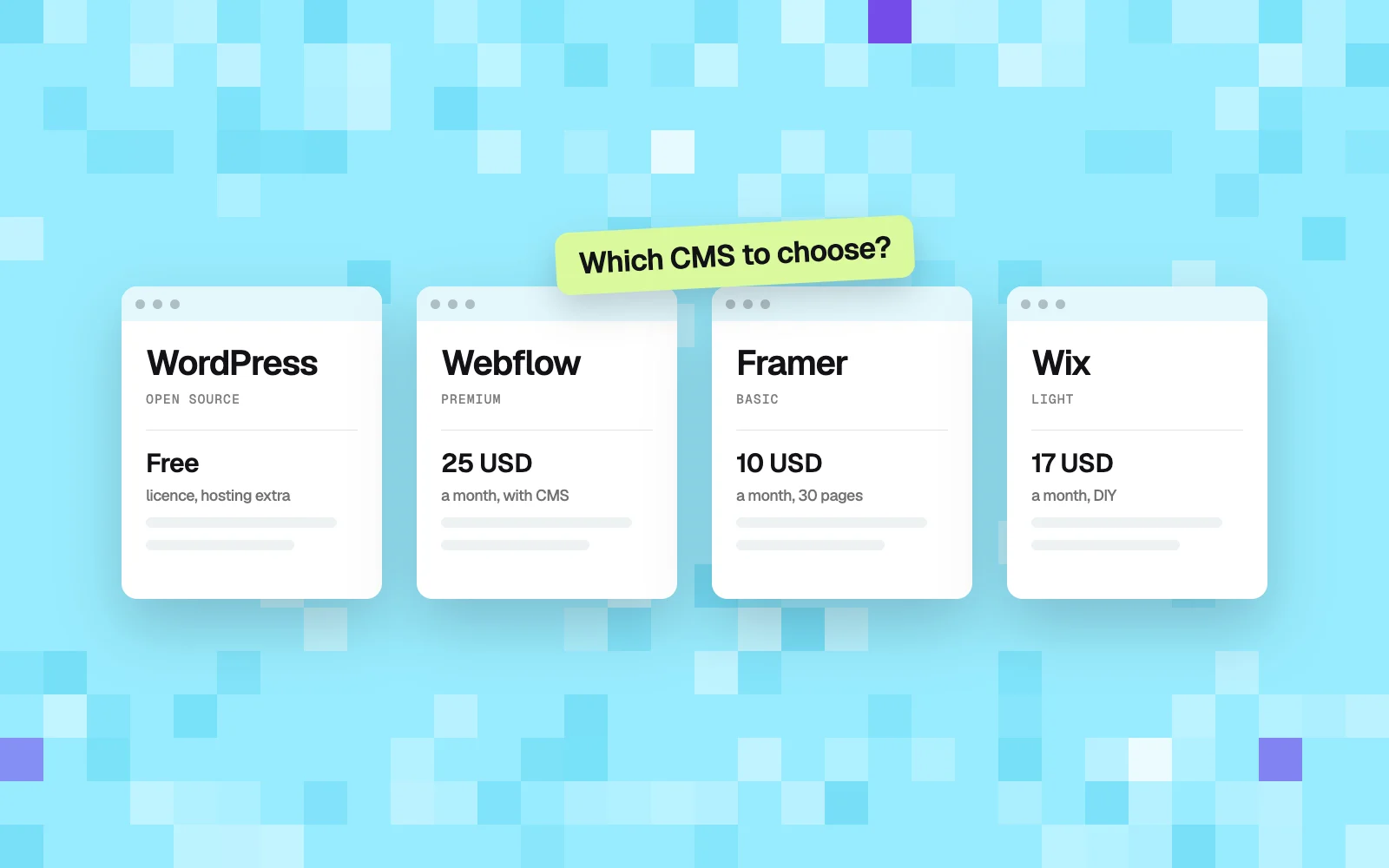
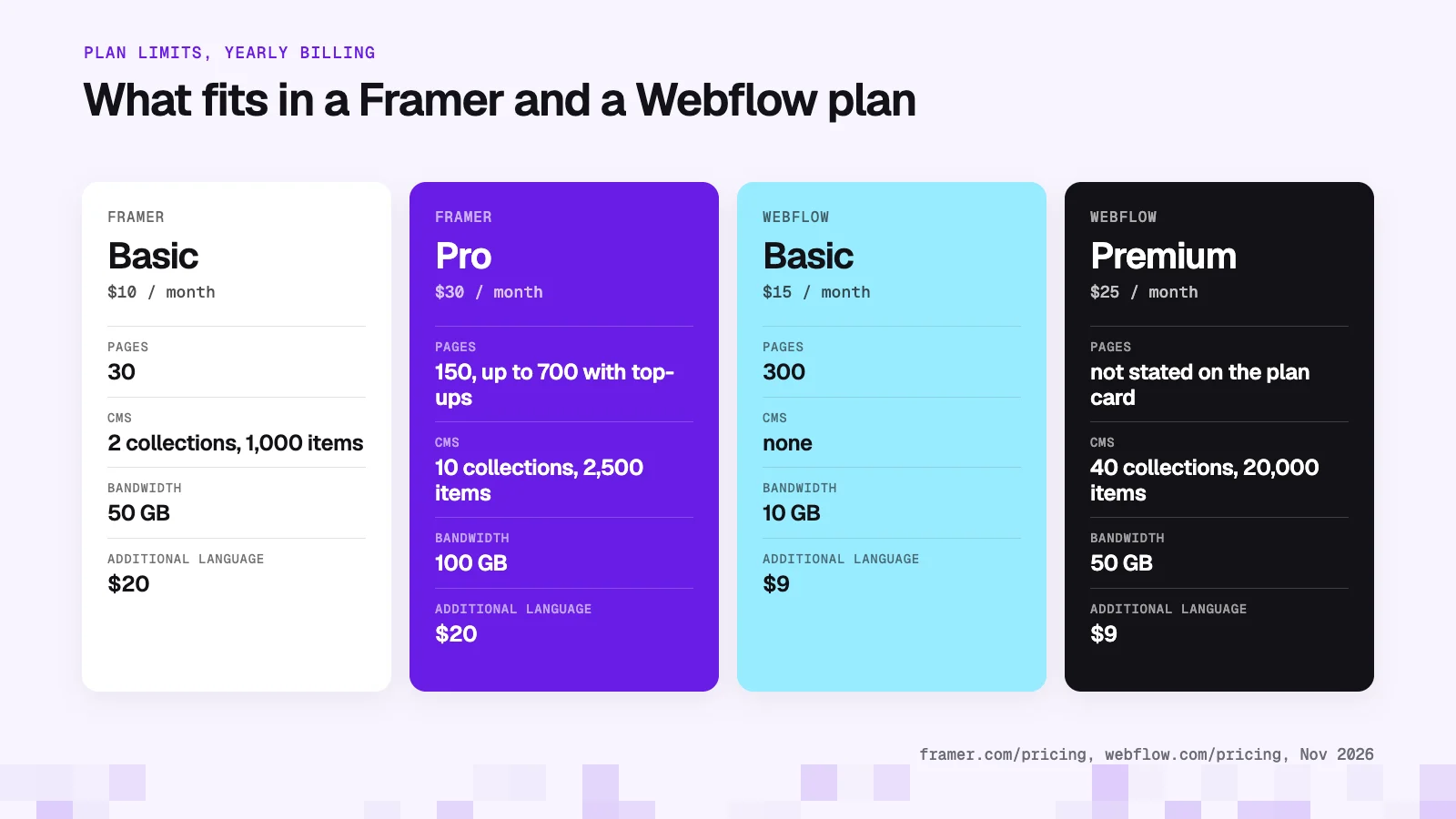
In a Webflow vs Framer comparison, Framer is cheaper at the entry level: $10 against $15 a month for the lowest paid plan on yearly billing. The bigger difference is the CMS. In Framer a blog fits the Basic plan, while in Webflow the CMS starts with the Premium plan at $25.
Webflow prices come from the official Webflow pricing page. I confirmed the plan prices on November 23, 2026. The limits, seats and add-ons come from the same page, checked on November 17, 2026.
| Criterion | Framer Basic | Framer Pro | Webflow Basic | Webflow Premium |
|---|---|---|---|---|
| Price on yearly billing | $10 | $30 | $15 | $25 |
| Price on monthly billing | $15 | $45 | $25 | $39 |
| Local currency price list | yes, seen in Poland | yes, seen in Poland | US dollars only | US dollars only |
| Pages | 30 | 150, up to 700 with top-ups | 300 | not stated on the plan card |
| CMS | 2 collections, 1,000 items | 10 collections, 2,500 items | none | 40 collections, 20,000 items |
| Bandwidth | 50 GB | 100 GB | 10 GB | 50 GB |
| Additional language | $20 | $20 | $9 | $9 |
| Additional person editing | $20, content editor $10 | $20, content editor $10 | full seat $39, limited seat $15 | full seat $39, limited seat $15 |
| Over the bandwidth limit | one month of tolerance and an email | one month of tolerance and an email | higher plan after two months | higher plan after two months |
The 3-year cost in four scenarios
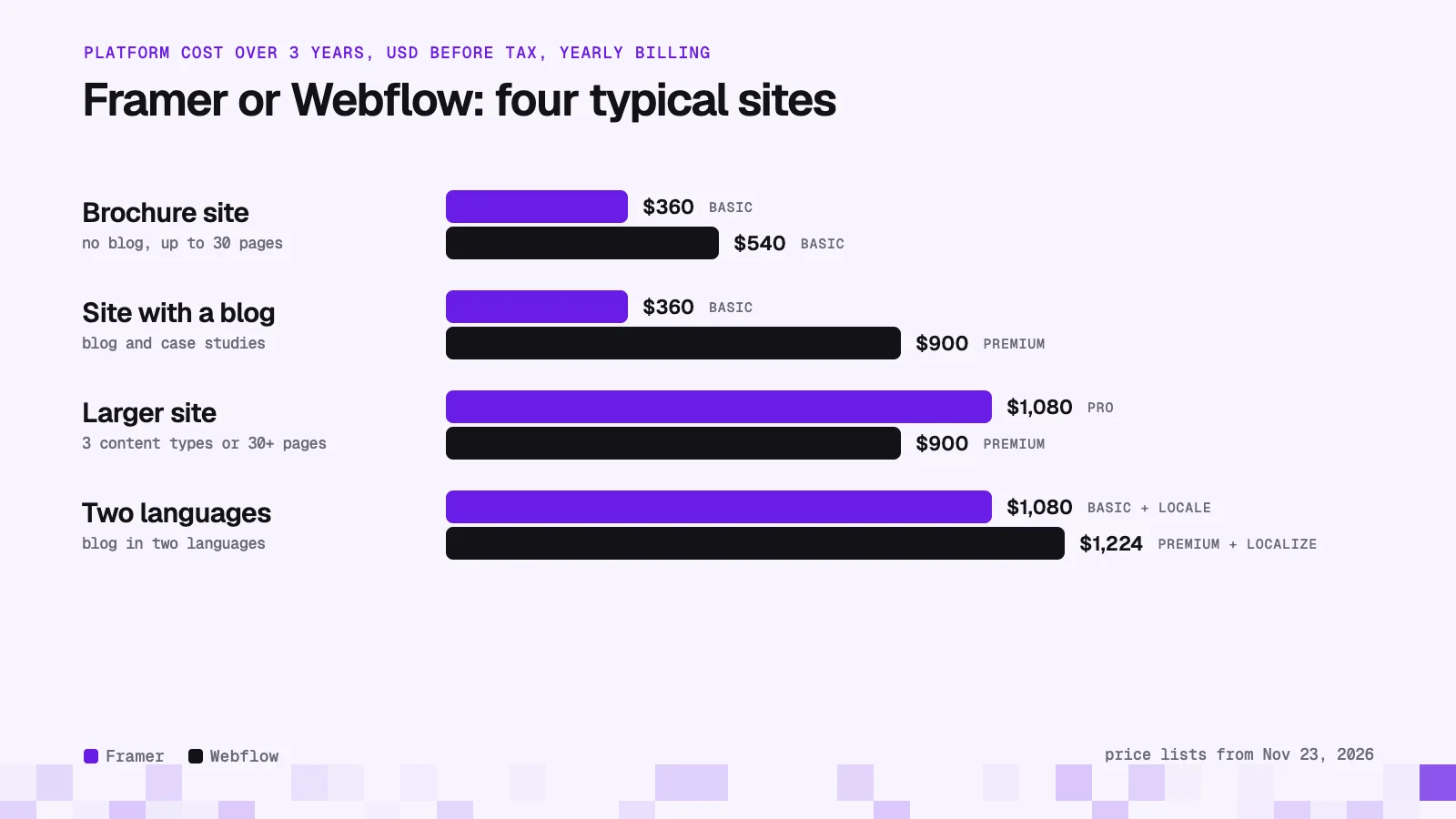
I calculated four typical small business sites. The assumptions are yearly billing, one person editing, and prices before tax.
| Scenario | Framer plan | Framer, 3 years | Webflow plan | Webflow, 3 years | Cheaper by |
|---|---|---|---|---|---|
| Brochure site without a blog, up to 30 pages | Basic | $360 | Basic | $540 | Framer, $180 |
| Site with a blog and case studies | Basic | $360 | Premium | $900 | Framer, $540 |
| Site with three content types or more than 30 pages | Pro | $1,080 | Premium | $900 | Webflow, $180 |
| Site with a blog in two languages | Basic + 1 locale | $1,080 | Premium + Localize Essential | $1,224 | Framer, $144 |
The biggest difference in Framer's favor is a small site with a blog: $540 over three years, or $180 a year. The result reverses once the site outgrows the Basic limits. Then Framer Pro costs $360 a year and Webflow Premium costs $300.
Framer vs Webflow: which to choose for a company website
Choose Framer when the site is small, needs to be ready quickly and is edited by one or two people. Choose Webflow when there will be a lot of content, the site is meant to grow for years, or you need several languages. The subscription price settles the question only for simple sites.
I use a few plain criteria when I quote a project:
- Number of content types. A blog and case studies are two collections, which fits Framer Basic. Three or more content types mean Framer Pro or Webflow Premium, and then Webflow is cheaper.
- Number of pages. Up to 30 pages fits Framer Basic. Above that the Pro plan starts.
- Languages. Each language in Framer is $20 a month. In Webflow the Localize Essential add-on is $9 per language.
- Redirects. If you are moving an old site with traffic from Google, you need URL redirects, and Framer includes them only on Pro.
- Who edits. In Framer a content editor costs $10 a month. In Webflow a client's person can have a free seat if the contractor is on the right plan.
The fourth point is often overlooked and matters a lot. When a site is rebuilt, old addresses must point to new ones, otherwise the site loses its rankings. In Framer this means the Pro plan at least for the duration of a website migration, even if the site itself would fit Basic.
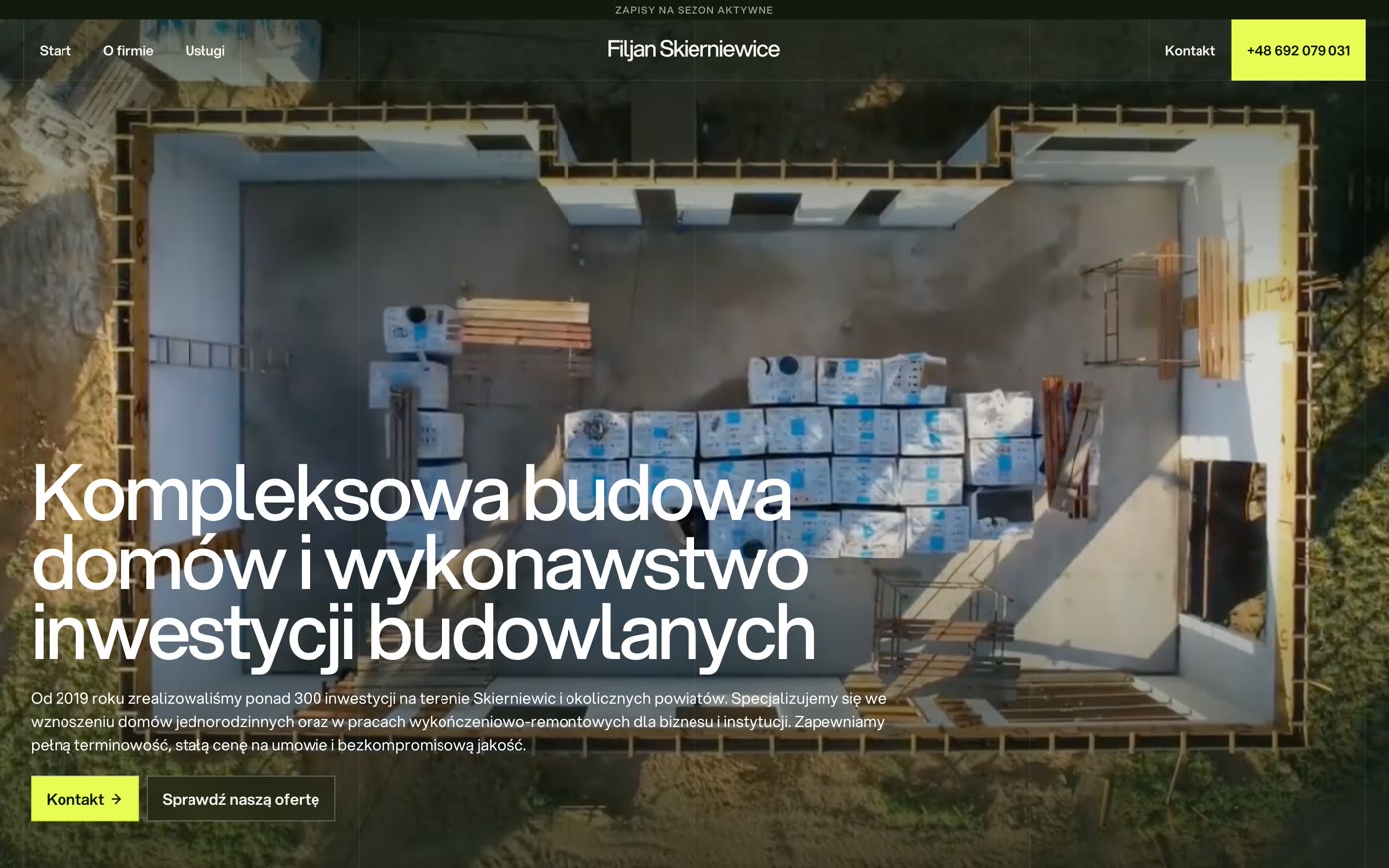
An example from my own work: I built the website of Filjan Bud, a construction company, in Webflow, and it took 4 weeks from the first conversation to the finished site. The site has case studies in the CMS and a form with 5 questions, including scope, budget, deadline and location of the build. More is in the construction company website case study (in Polish).
Framer vs WordPress, Wix and Figma in one paragraph
These comparisons come up often, so briefly. Framer vs WordPress: WordPress is free as software, but you pay separately for hosting, a theme, plugins and updates, while Framer puts everything in one subscription. Framer vs Wix: both are builders with hosting included, and in my opinion Framer gives more design freedom and sits closer to a designer's tools. Framer vs Figma: they are not competitors, because Figma is for designing and Framer publishes the finished site. A Figma design can be moved to Framer, which I do as part of my Figma to Framer service.
Beyond the subscription: templates, a contractor and maintenance
The subscription is the smallest part of what a Framer site costs. The full picture includes design and build, possibly a template, and care after launch.
Framer templates are available in the Framer Marketplace, together with components and plugins. There are free and paid templates, and the authors set the prices of the paid ones. A template shortens the work, but it does not replace content, photos and fitting the site to what the company sells.
When I build a site, I agree the scope before the start, and I quote website development in Framer, Webflow and code by the same rules. After launch there is website maintenance, if you do not want to watch over changes, forms and speed yourself.
Checklist before you buy a Framer plan
Check seven things before you pay for a plan. It takes fifteen minutes and usually settles the choice between Basic and Pro.
- Count the pages. Leave out CMS entries. Above 30 you need Pro.
- Count the content types in the CMS. Blog, case studies, job openings, testimonials. Above two you need Pro.
- Check whether you are moving an old site. Redirects are on Pro only.
- Count the languages. Each additional one is $20 a month on yearly billing.
- Count the people who will edit. A content editor is $10, a full editor $20 a month. Ask your contractor about Pro Expert status.
- Pick the billing cycle. Yearly is about one third cheaper and includes a complimentary domain.
- Check the currency and tax in the order summary. A VAT-registered company enters its tax ID to handle the reverse charge.
Framer review: who this pricing suits and who it does not
My view after comparing both price lists: Framer has the cheapest sensible plan today for a small site with a blog, and a price list in local currency is more convenient than a dollar-only one. It does worse for sites that grow, because every threshold has its own top-up.
It fits less well for a company with a large content base, several markets and several people in marketing. An example: the Pro plan, two additional languages and two content editors come to $30 + $40 + $20, which is $90 a month and $1,080 a year. With a setup like that it is worth pricing Webflow, or a site in code, where there are no fees per collection or per language.
Frequently asked questions
How much does Framer cost per month?
The Basic plan costs $10 a month and the Pro plan $30 a month on yearly billing. On monthly billing they cost $15 and $45. Tax is added at checkout. Additional editors, languages and other add-ons are billed on top. These prices are as of November 23, 2026.
Is Framer free?
Yes, the Free plan has no time limit. The site then runs on a free Framer domain, with 1 GB of bandwidth and 500 AI credits a month. Framer describes this plan as ideal for non-commercial use. You can connect your own domain only on a paid plan.
Which is cheaper: Framer or Webflow?
For a small site Framer is cheaper. A site with a blog costs $120 a year on Framer Basic and $300 a year on Webflow Premium. When a site needs more than 30 pages or more than two CMS collections, Framer Pro costs $360 a year and is more expensive than Webflow Premium.
How much does an additional language cost in Framer?
Each additional locale costs $20 a month on yearly billing, which is $240 a year. You can add up to 20 locales on the Basic and Pro plans. On monthly billing the price per locale is higher.
How much does an additional editor cost in Framer?
A full editor costs $20 a month and a content editor $10 a month on yearly billing. The workspace owner is included, and people who only view and comment are free. Pro Experts get free editor access to client projects.
What happens if my site goes over the bandwidth limit in Framer?
Framer lets you exceed the bandwidth limit for one month and sends an email notification. After that you need to change the plan or buy a top-up: $50 per 100 GB, up to a maximum of 2 TB. For page and CMS limits the editor asks you to upgrade right away.
Is the Framer Basic plan enough for a company website with a blog?
Yes, if the site has up to 30 pages, no more than two CMS collections and up to 1,000 items. A blog and case studies fit within that. You need Pro for a third collection, for more pages, or when you are moving an old site and need redirects.
If you want to work out what your site would cost in Framer or in Webflow, write to me. I reply within 1 day.