Which CMS to choose for a business website in 2026: WordPress, Webflow, Framer or Wix
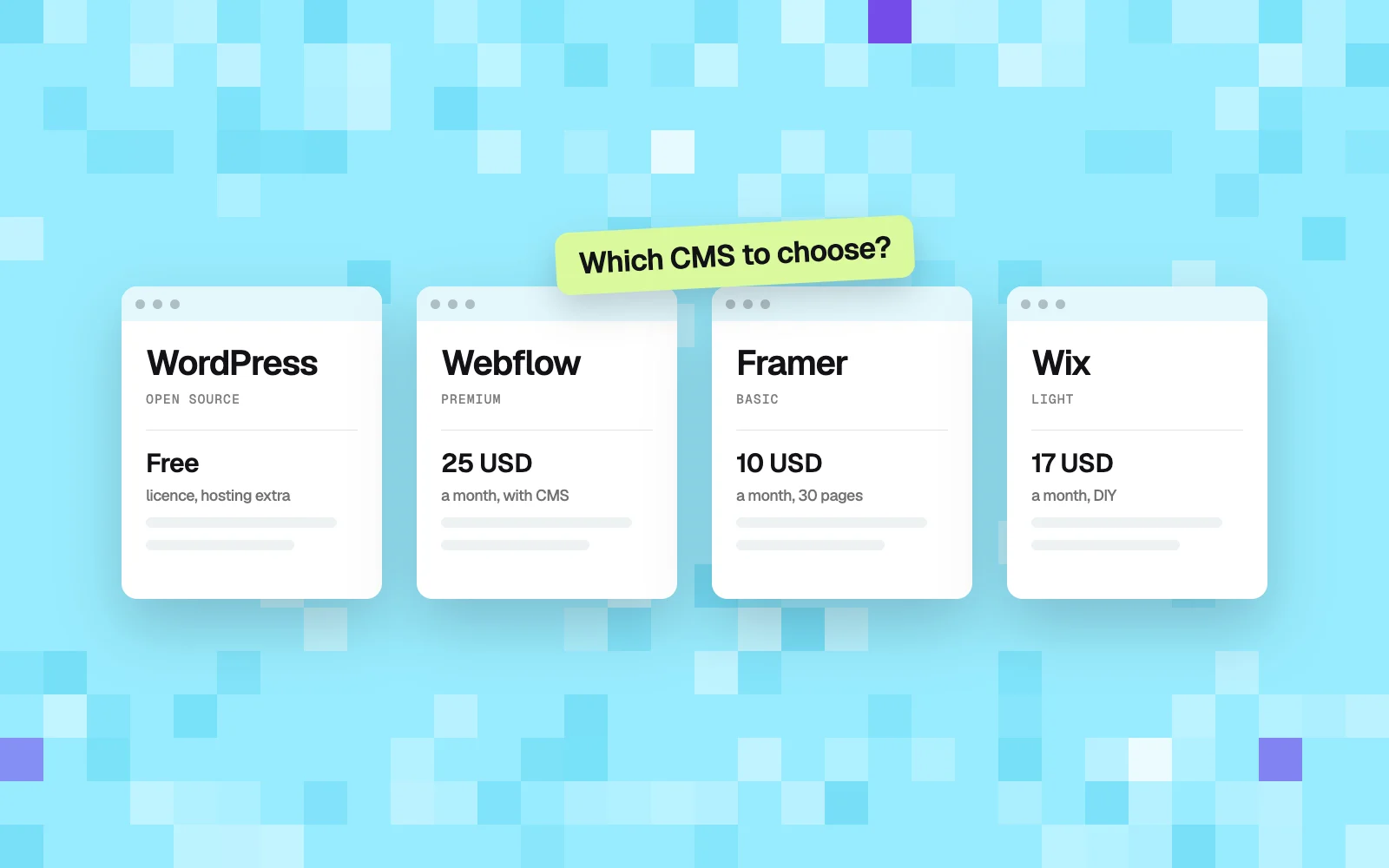
For a typical business website with a dozen pages and a blog or portfolio, choose Webflow (25 USD a month on the Premium plan) or Framer (from 10 USD) if design and simple editing without plugins matter. Choose Wix if you want to build the site yourself and fast, and WordPress if you need a large store, user accounts or specific plugins and have someone to keep it updated. Prices from the vendors' pricing pages on 18 November 2026, in USD, on yearly billing, excluding tax.
Which CMS to choose for a business website, when every agency recommends something different, is the question I hear at the start of almost every call. One says "WordPress, everyone uses it", another says "Wix, you can do it yourself over a weekend", a third shows you a site built in Framer. This article compares the four systems small businesses ask about most: WordPress, Webflow, Framer and Wix. Every number comes from the vendors' pricing pages and reports from November 2026, with links so you can check them.
Before writing, I went through the comparisons that rank highest for this question. The most prominent one is a ranking from a WordPress blog that puts WordPress first and says it is built on WordPress itself. Others come from agencies or the platforms' own blogs. Few include Framer, none works out the cost over several years, and none says who is responsible for updates once the site is live.
One note up front. I'm Max Miskow and I build sites in Webflow, Framer and code. I don't build sites in Wix, and one of my services is moving sites from WordPress to Webflow. That is why I give a source for every criterion and say plainly when a system I don't sell is the better choice.
Which CMS to choose: the short answer
Choose a system based on who will maintain the site and which features you actually need, not on popularity. For a business website with a blog or portfolio that your team will edit without a developer, Webflow or Framer usually fits best. For a site you put together yourself in a few days, Wix fits. For a large store, a content portal or a site with customer accounts, WordPress fits.
A quick overview, which I come back to below for each system:
| Situation | Which CMS to choose | From, per month (yearly billing) | Who handles updates |
|---|---|---|---|
| Business site with a blog or portfolio, built by a freelancer or agency | Webflow | 25 USD (Premium) | The platform |
| Design-led site, up to 30 pages, little CMS content | Framer | 10 USD (Basic) | The platform |
| Site you build yourself, without help | Wix | 17 USD (Light) | The platform |
| Large store, customer accounts, courses, forum | WordPress | Hosting at your provider's price | You or your developer |
| WordPress without your own server | WordPress.com | 25 USD (Business) | The platform, plugins are yours |
What a CMS is and how it differs from a website builder
A CMS (content management system) is software where you add and change a website's content without writing code: text, blog posts, images, job listings. A website builder is a CMS combined with a visual editor and hosting in one subscription. In practice, for a small business, "which CMS" means choosing between two families: open source software on your own hosting, or a platform that does everything for you.
WordPress represents the first family. According to WordPress.org, it is software licensed under the GPLv2 or later that you install on a server of your choice. The licence is free, but hosting, the theme, plugins and updates are on you.
Webflow, Framer and Wix belong to the second family. You pay for a plan, and the server, backups and platform updates are included. You don't install plugins on your own server, so there are none to patch either. In return, you work within what the platform allows.
| Type of system | Examples | Hosting | What you pay for | Main strength | Main limitation |
|---|---|---|---|---|---|
| Open source CMS | WordPress, Joomla, Drupal | Your own, you pick the provider | Hosting, theme, plugins, hours of updates | Full control, thousands of add-ons | Maintenance and security are yours |
| Design platform | Webflow, Framer | Included in the plan | A plan per site | Any design, editing without a developer | Plan limits, prices in USD |
| DIY website builder | Wix, Squarespace | Included in the plan | A plan per site | Fastest start without hiring anyone | Less freedom as the site grows |
| Custom code | Own code, headless CMS | You pick the provider | A developer | No platform limits | Every layout change needs a developer |
What is the most popular CMS in 2026
The most popular CMS in the world is WordPress: according to W3Techs, in November 2026 it runs 38.5% of all websites and 57.5% of sites whose CMS can be detected. Shopify and Wix come next. Webflow and Framer each have a few tenths of a percent, which does not make them a worse choice for a business website.
Full figures from the W3Techs overview, November 2026:
| System | Share of all websites | Share of sites with a known CMS | Type |
|---|---|---|---|
| WordPress | 38.5% | 57.5% | Open source |
| Shopify | 5.4% | 8.1% | Ecommerce platform |
| Wix | 4.2% | 6.2% | Website builder |
| Squarespace | 2.4% | 3.6% | Website builder |
| Joomla | 1.0% | 1.6% | Open source |
| Webflow | 0.8% | 1.2% | Design platform |
| Drupal | 0.6% | 0.9% | Open source |
| Framer | 0.2% | 0.3% | Design platform |
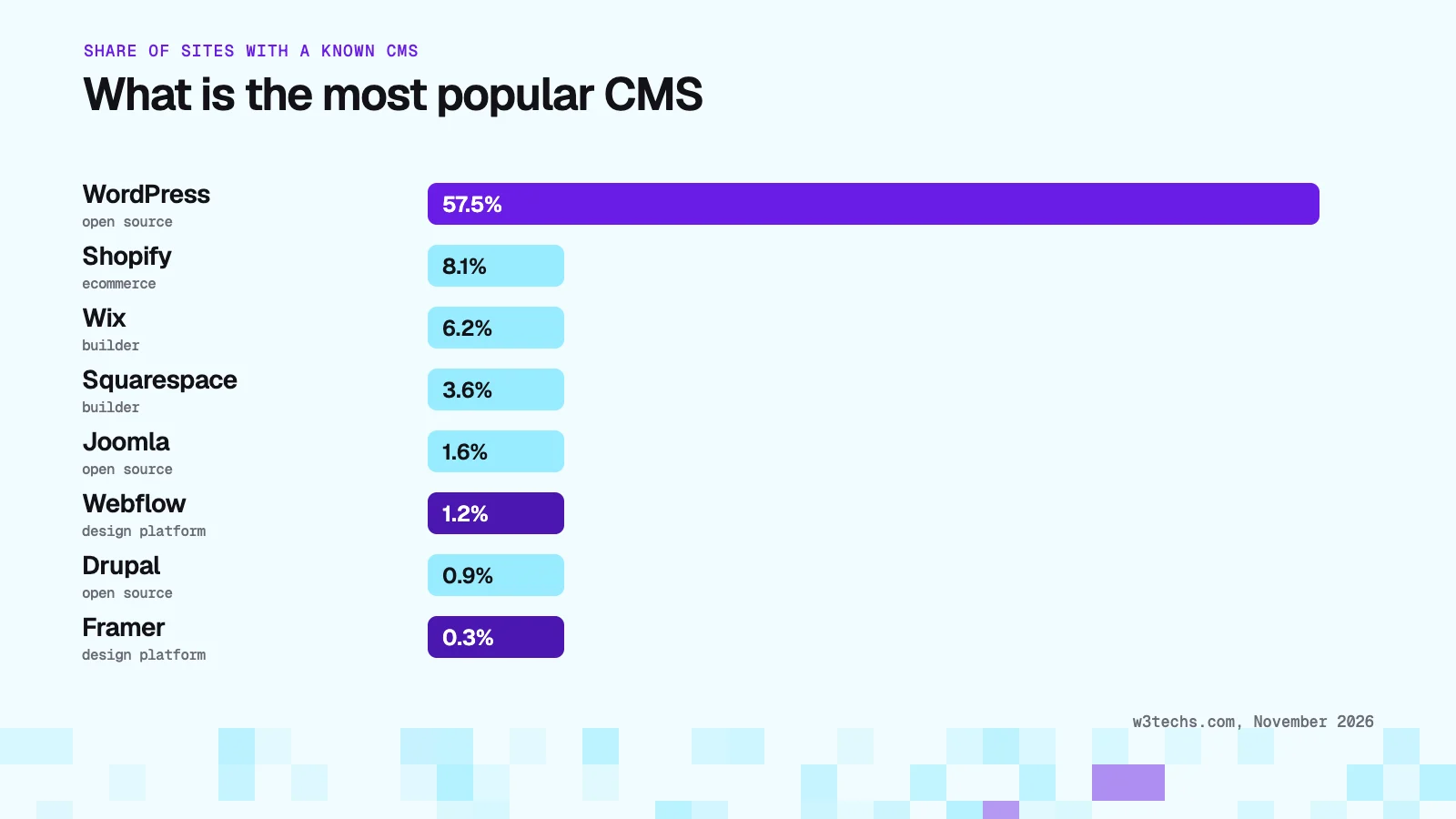
These numbers need careful reading. W3Techs also reports that 33% of websites use none of the systems it monitors, meaning they are hand-coded or built on tools outside the list. Popularity mostly tells you two things: it is easier to find someone who knows WordPress, and WordPress is a more frequent target for attacks. It does not tell you which system will work better for a site with ten pages and a contact form.
CMS comparison table: WordPress, Webflow, Framer and Wix
The four systems differ mainly in who is responsible for maintenance, how much content the CMS holds and whether you can run a store on them. Prices and limits come from the pricing pages of Webflow, Framer, Wix and WordPress.com, checked on 18 November 2026.
| Criterion | WordPress (own hosting) | Webflow | Framer | Wix |
|---|---|---|---|---|
| Licence | Free, GPLv2 | Paid plan per site | Paid plan per site | Paid plan per site |
| Cheapest plan with your own domain | Hosting + domain | Basic, 15 USD/mo | Basic, 10 USD/mo | Light, 17 USD/mo |
| Plan with a CMS for a blog or portfolio | No limit on posts | Premium, 25 USD, 20,000 items | Basic: 2 collections, 1,000 items; Pro: 10 collections, 2,500 items | Blog on every paid plan |
| Page limit | No limit | 300 static pages on Basic | 30 on Basic, 150 on Pro | Not stated on the pricing page |
| 301 redirects | Usually a plugin | On paid plans | From the Pro plan | SEO tools in the plans |
| Store | WooCommerce and other plugins | Separate ecommerce plans | No store on the pricing page | From Core, 29 USD |
| Extra editors | Accounts in the dashboard | Workspace seats, paid separately | 20 USD/mo per editor | 2 collaborators on Light, 10 on Business |
| Who updates the system | You or your developer | The platform | The platform | The platform |
| Best for | Stores, portals, unusual features | Business sites with a CMS | Design-led sites | Sites you build yourself |
Two notes on the table. All prices are for yearly billing, in US dollars, excluding tax. Wix states on its pricing page that prices and currency vary by location and that USD amounts are for reference only.
How much a CMS costs: plan prices in 2026
A hosted platform costs 10 to 39 USD a month for a typical business website on yearly billing. With WordPress you pay no licence, but you pay for hosting, the domain and time spent on updates. Because building the site is a separate cost, compare the subscription over several years, not the price of the first month.
The cost over 3 years
A simple calculation: the monthly price on yearly billing times 36 months, excluding tax and the domain. That is what you pay for the platform alone over three years of running the site.
| Plan | Per month | 3 years (36 months) | What it includes, in short |
|---|---|---|---|
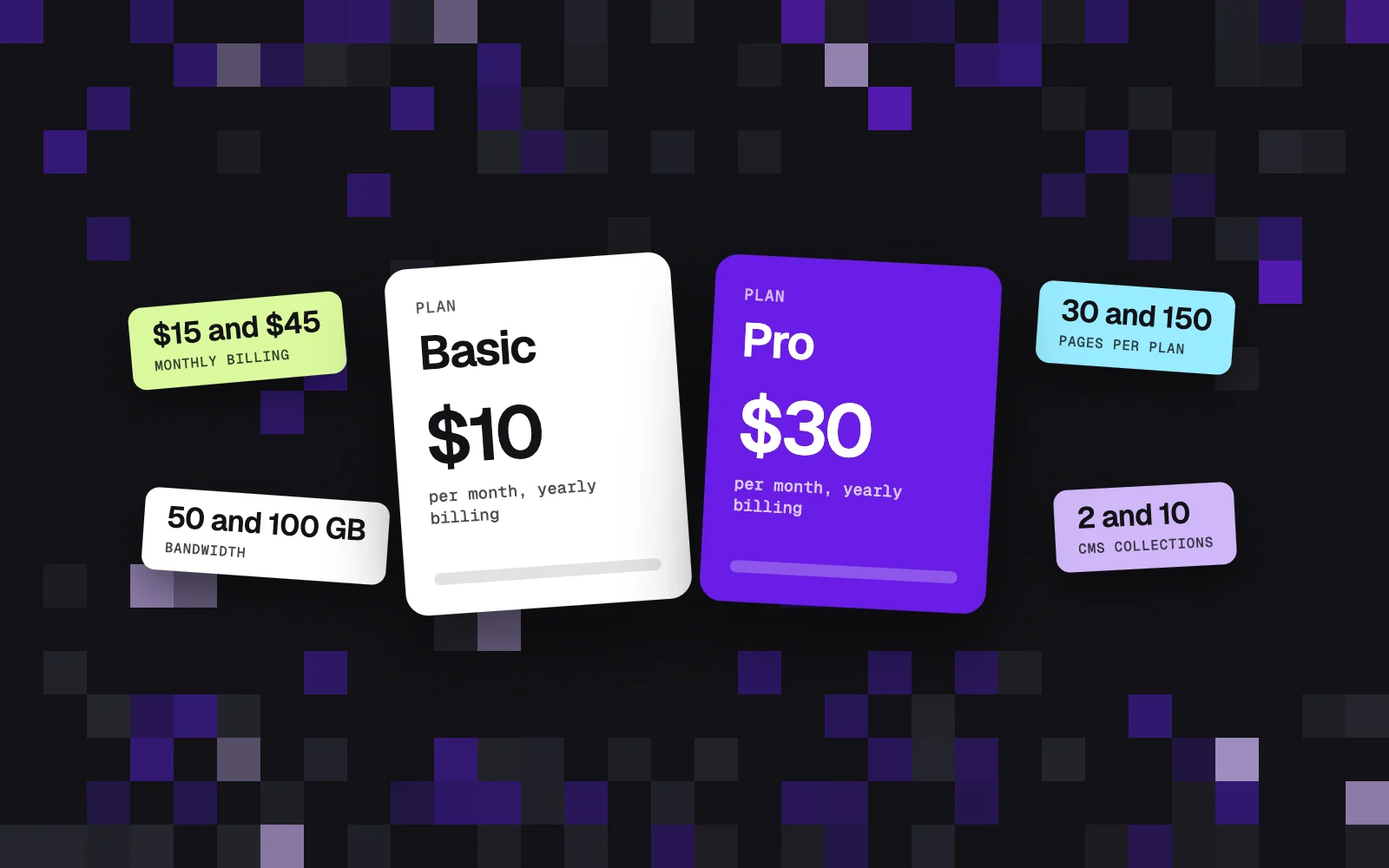
| Framer Basic | 10 USD | 360 USD | 30 pages, 2 CMS collections, 50 GB bandwidth |
| Webflow Basic | 15 USD | 540 USD | 300 static pages, no CMS |
| Wix Light | 17 USD | 612 USD | 2 GB storage, 2 collaborators |
| Webflow Premium | 25 USD | 900 USD | CMS up to 20,000 items |
| WordPress.com Business | 25 USD | 900 USD | 50 GB, plugins, real-time backups |
| Wix Core | 29 USD | 1,044 USD | 50 GB, payments, basic ecommerce |
| Framer Pro | 30 USD | 1,080 USD | 150 pages, 10 CMS collections, redirects |
| Wix Business | 39 USD | 1,404 USD | 100 GB, ecommerce, 10 collaborators |
| WordPress on your own hosting | Provider's price | Hosting x 36 + plugins + maintenance hours | Depends on hosting and the number of plugins |
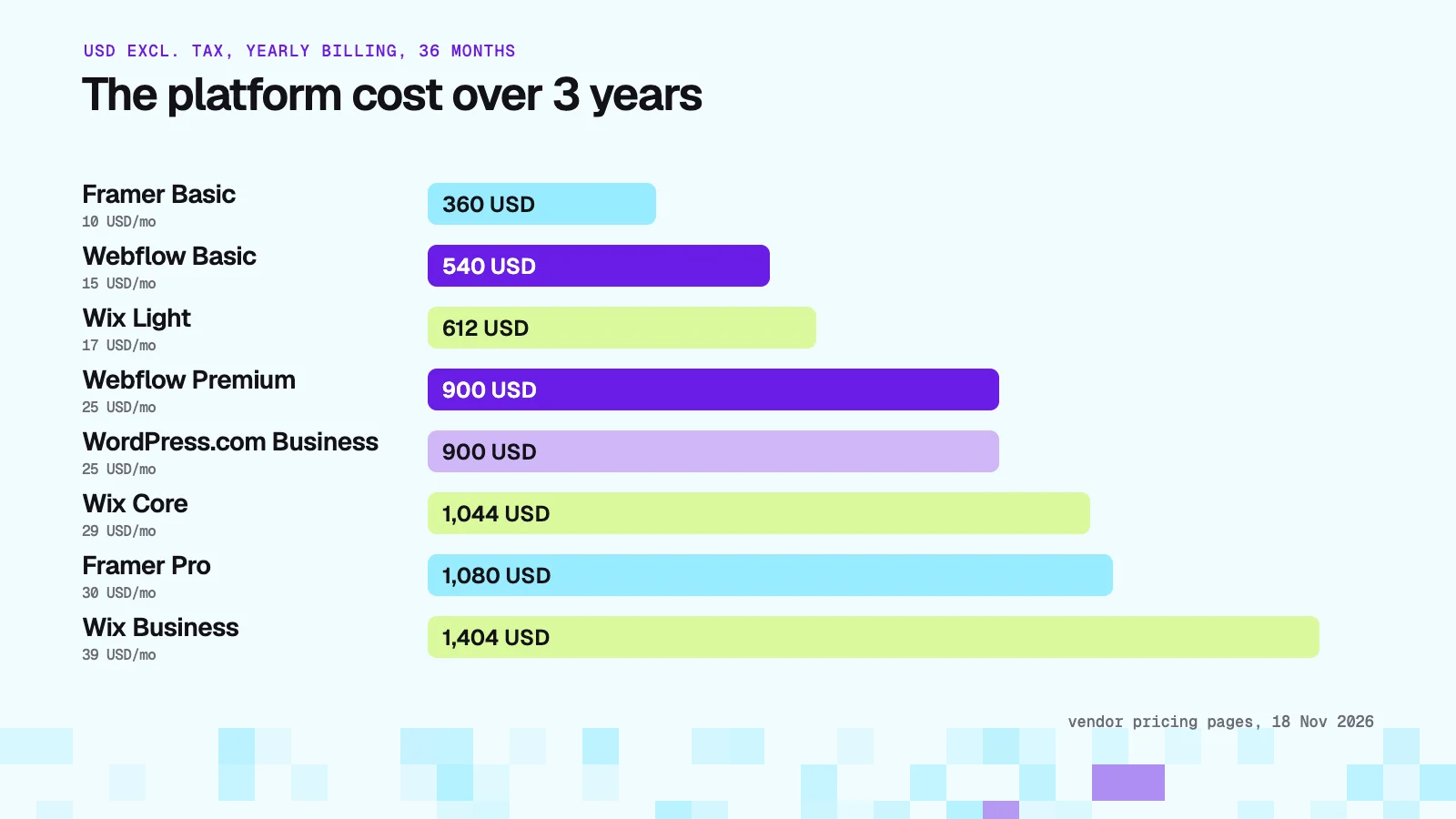
The differences are smaller than "free versus paid" comparisons suggest. Between the cheapest and the most expensive plan in the table there is about 1,000 USD over three years. What changes the budget more is how many hours maintenance takes and whether the plan leaves room for the site to grow.
Wix pricing: what the plans include
Wix has four paid plans: Light at 17 USD, Core at 29 USD, Business at 39 USD and Business Elite at 159 USD a month, on yearly billing. All of them include a custom domain (free for the first year), hosting and 24/7 customer care. Payments and basic ecommerce start on the Core plan. There is a free plan, but the site then sits on a Wix address and carries Wix branding.
The free domain only covers the first year, and prices depend on your country, so check the amount at checkout.
If you are buying from outside the US, note that Webflow, Framer and WordPress.com list prices in US dollars excluding tax, Wix shows prices by country, and all of them add tax at checkout based on your location.
Best website builder for small business: Wix, Framer or Webflow
The best website builder for small business owners depends on who builds the site. If you build it yourself, with no outside help, Wix is the fastest. If a designer builds it and the look and animations matter, Framer is a good choice. If the site has a larger CMS, for example a blog, case studies and job listings, and your team will keep developing it for years, Webflow fits better.
Wix is built for doing it yourself. Its pricing page promises templates, a drag and drop editor and creating a site from a single AI prompt. The upside is everything in one place: domain, hosting, payments, bookings. The downside is that as the site grows, you reach the limits of what the editor lets you set up sooner.
Framer is the cheapest to start and very fast for a designer to work in. The Basic plan, however, has 30 pages, 2 CMS collections and 1,000 items, and the pricing page lists redirects only on the Pro plan. For a service business site with a dozen pages that is enough. For a blog meant to grow for years, plan for Pro and add-ons from the start.
Webflow has the deepest CMS of the three: 20,000 items on the Premium plan, with collections that share one template for posts, case studies or locations. It is a good choice when a site has many pages built from one pattern. I compare Webflow and Framer in detail in a separate article, because there are more differences than fit in one section.
| Feature | Wix | Framer | Webflow |
|---|---|---|---|
| Who usually builds the site | The business owner | A designer | A designer or agency |
| Cheapest plan with a domain | 17 USD | 10 USD | 15 USD |
| Plan for a site with a blog | Light, 17 USD | Pro, 30 USD for a larger blog | Premium, 25 USD |
| CMS content limit | Not stated on the pricing page | 1,000 items on Basic, 2,500 on Pro | 20,000 items on Premium |
| Store | From Core, 29 USD | None on the pricing page | Separate ecommerce plans |
| Strongest point | Fast DIY start | Design and speed of building | CMS and room to grow |
| What to watch | Growth over the years | Page limits and editor fees | USD prices, higher entry price |
Wix vs WordPress
Wix vs WordPress is a choice between convenience and full control. Wix handles hosting, updates and backups for you, but limits you to its own tools. WordPress lets you build almost anything, from a store to a course platform, but someone has to update it regularly.
That second part matters more than it seems. According to Patchstack's report for 2025, 11,334 new vulnerabilities were found in the WordPress ecosystem, 42% more than the year before. 91% of them were in plugins, and only 6 in WordPress core, all low priority. 46% of vulnerabilities had no fix on the day they were made public.
The lesson for a small business is simple. WordPress itself is well maintained, but every plugin is more code to watch. If nobody in your company will run updates and backups every month, Wix or another hosted platform takes that job off your plate. If you need a feature Wix doesn't have, WordPress with good maintenance beats Wix with workarounds.
The same logic applies to Framer vs WordPress. Framer gives you a polished design and no plugins to patch, while WordPress gives you no limits on pages, posts or add-ons. For a business site of up to 30 pages without a store, Framer needs less work after launch. For a portal with thousands of articles, WordPress is the safer choice in terms of limits.
Best CMS for a small business, by type of business
There is no single best CMS for small business owners, but for typical kinds of businesses the answer is fairly predictable. The table below shows which CMS usually works and what the plan alone costs. Building the site is a separate cost: with me, a typical business website project costs between PLN 3,000 and 15,000 net, whether it is built in Webflow, Framer or code.
| Type of business and site | Choice | Plan | Per month | Why |
|---|---|---|---|---|
| Service business, 5 to 15 pages, no blog | Webflow or Framer | Webflow Basic or Framer Basic | 15 or 10 USD | Low cost, no plugins |
| Construction company with a portfolio | Webflow | Premium | 25 USD | Projects in the CMS from one template |
| Expert or consultant with a blog | Webflow or Framer | Premium or Pro | 25 or 30 USD | A blog without running a server |
| Small business, owner builds the site | Wix | Light | 17 USD | Everything in one editor |
| Salon, clinic, online booking | Wix | Core or Business | 29 or 39 USD | Booking and payments in the plan |
| Store with thousands of products | WordPress with WooCommerce or Shopify | Managed hosting | Provider's price | Limits and wholesaler integrations |
| Content portal, many authors | WordPress | Managed hosting | Provider's price | No post limit, detailed roles |
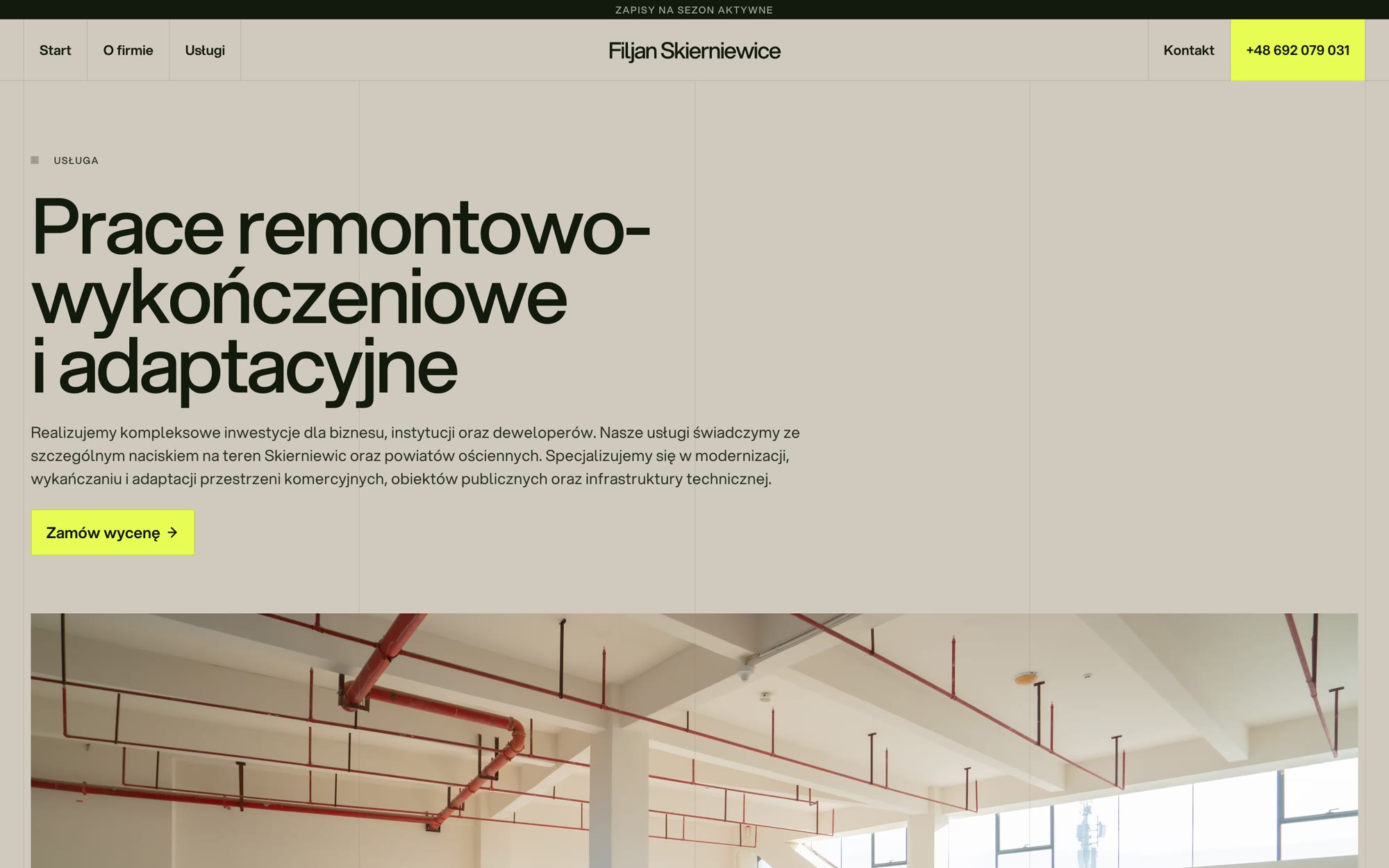
An example from my own work: the Filjan Bud construction company website (in Polish) went live 4 weeks after our first call. It has a form with 5 questions, including scope, budget, timing and location of the build. For a site like this, the choice of system matters less than making sure the form gives the contractor concrete enquiries and that service pages and projects are easy to add from one pattern.
How to choose a CMS: a checklist in 8 questions
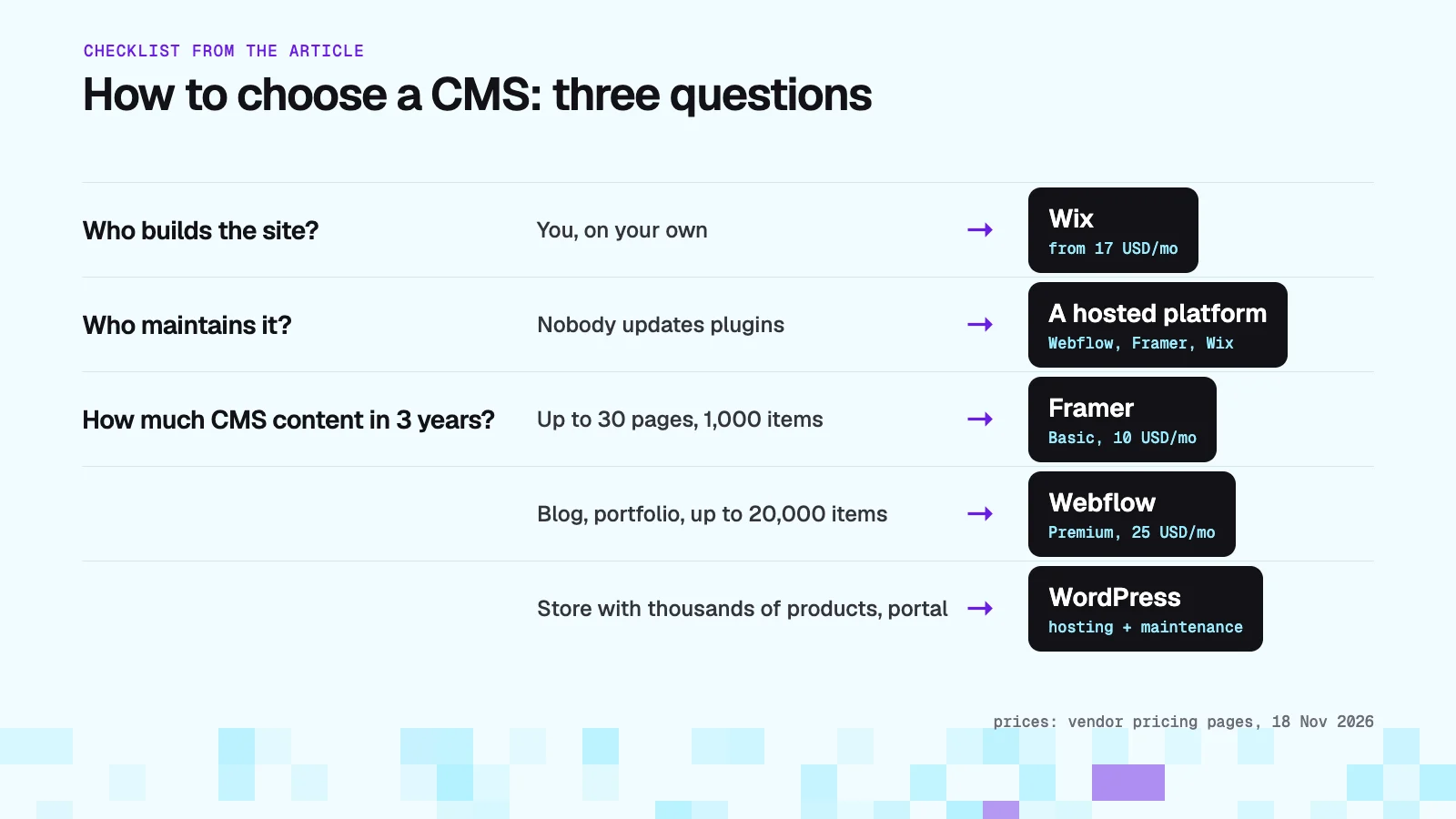
The easiest way to choose a CMS is to answer a few questions about the site and your team before you compare platforms. I use the list below on calls with clients. Each question narrows the field, and after eight there are usually one or two systems left.
- Who will build the site? You: Wix. A designer or agency: Webflow, Framer or WordPress.
- Who will maintain it after launch? If nobody will update plugins every month, choose a hosted platform.
- How much CMS content will there be in 3 years? Up to 1,000 items, Framer Basic is enough; up to 20,000, Webflow Premium; no limit, WordPress.
- How many regular pages, outside the blog? Above 30, Framer Basic is out; above 150, Framer Pro is out unless you buy more pages.
- Do you sell online? A few services: Wix Core or a Webflow ecommerce plan. Thousands of products: WordPress with WooCommerce or Shopify.
- How many people will edit content? In Framer each extra editor is 20 USD a month; Wix Light has 2 collaborator seats.
- Will the site have several languages? Check the cost of the translation add-on on the chosen platform's pricing page, as it is usually billed separately.
- Whose accounts will they be? The plan, the domain and admin access should be in your name, not your agency's, on every system.
Costs you won't see on the pricing page
Most comparisons stop at the plan price. Yet every system has costs that only show up after a few months. I collected them from the vendors' pricing pages so you can add them up before you decide.
| System | Hidden cost | What the pricing page says |
|---|---|---|
| Webflow | Going over bandwidth | Two consecutive months over the limit trigger an automatic plan upgrade |
| Webflow | No CMS on Basic | A blog or portfolio needs the Premium plan |
| Framer | Extra editors | 20 USD a month per editor |
| Framer | More pages and content | 20 USD per 100 pages, 40 USD per 10 collections, 20 USD per 10,000 CMS items |
| Wix | Domain after the first year | The free domain voucher only covers the first year |
| Wix | Currency and country | Prices vary by location, USD amounts are for reference |
| WordPress | Plugins and theme | Paid licences, usually renewed every year |
| WordPress | Updates | Hours of work every month or a maintenance contract |
One more cost applies to every system: the time of whoever updates the content. Ask your agency to show you how adding a post or a project works in the system they propose.
You can outsource maintenance on any of these systems. With me, website maintenance is billed by the hour, with no subscription and no monthly minimum, and small changes are done within 2 days. If you already have a WordPress site and want to move to Webflow, I describe how on the WordPress to Webflow migration page.
Frequently asked questions
Which CMS should a small business choose?
For a small service business with a dozen pages, Webflow or Framer usually fits if an agency or freelancer builds the site, and Wix if you build it yourself. WordPress makes sense for a large store, customer accounts or a specific plugin you can't replace. Decide based on who will maintain the site.
What is the most popular CMS?
WordPress. According to W3Techs, in November 2026 it runs 38.5% of all websites and 57.5% of sites with a known CMS. Shopify is second (8.1%) and Wix third (6.2%). Webflow has 1.2% and Framer 0.3% of the CMS market.
Is Wix free?
Wix has a free plan, but the site then uses a Wix address and carries Wix branding. A custom domain and removing the branding require a paid plan: Light costs 17 USD, Core 29 USD and Business 39 USD a month on yearly billing, excluding tax.
How much does Wix cost?
According to the Wix pricing page on 18 November 2026, the plans cost 17, 29, 39 and 159 USD a month on yearly billing. Over 3 years the Light plan comes to 612 USD and Core to 1,044 USD. Wix says prices vary by country, so you will see the final amount at checkout.
What do Wix reviews say, and is Wix worth it?
The top-ranking comparisons repeat two points about Wix: a fast start, because the domain, hosting, payments and bookings are all in one place, and less freedom to grow the site than in Webflow or WordPress. Wix is worth choosing if you build the site yourself and don't plan a large CMS or a big store.
Do Wix prices depend on the country?
Yes. Wix states that prices and currency vary by location, that the USD amounts are for reference, and that tax is added based on your billing address. Check the amount on the checkout page before you buy.
Does the choice of CMS affect Google rankings?
Not directly. Google evaluates the site: speed, content, headings and links, not the system it runs on. All four systems let you set titles, descriptions and a sitemap. They differ in whether 301 redirects are included in the plan (on Framer from the Pro plan) or need a plugin.
Can I switch CMS later?
Yes, but it is a project in its own right. You have to move the content, rebuild the forms and set up 301 redirects from the old URLs to the new ones so you don't lose traffic from Google. That is why it pays to choose a system that will hold your content for 2 to 3 years from the start.
If you are torn between two systems or have two quotes on different platforms, get in touch. I reply within 1 business day. I can also do a free audit of your current site: a 5 to 10 minute video with three things to improve.