Webflow vs WordPress: a comparison for a business website in 2026
For a typical business website with up to a few dozen pages and a blog or a portfolio, choose Webflow: you pay a fixed plan ($15 to $25 a month billed yearly, plus tax), and hosting, backups and updates are handled by Webflow. Choose WordPress when you need a large online store, a customer portal, lots of plugins, or you already have a team that maintains it. The WordPress software itself is free, but hosting, plugins and updates are on you.
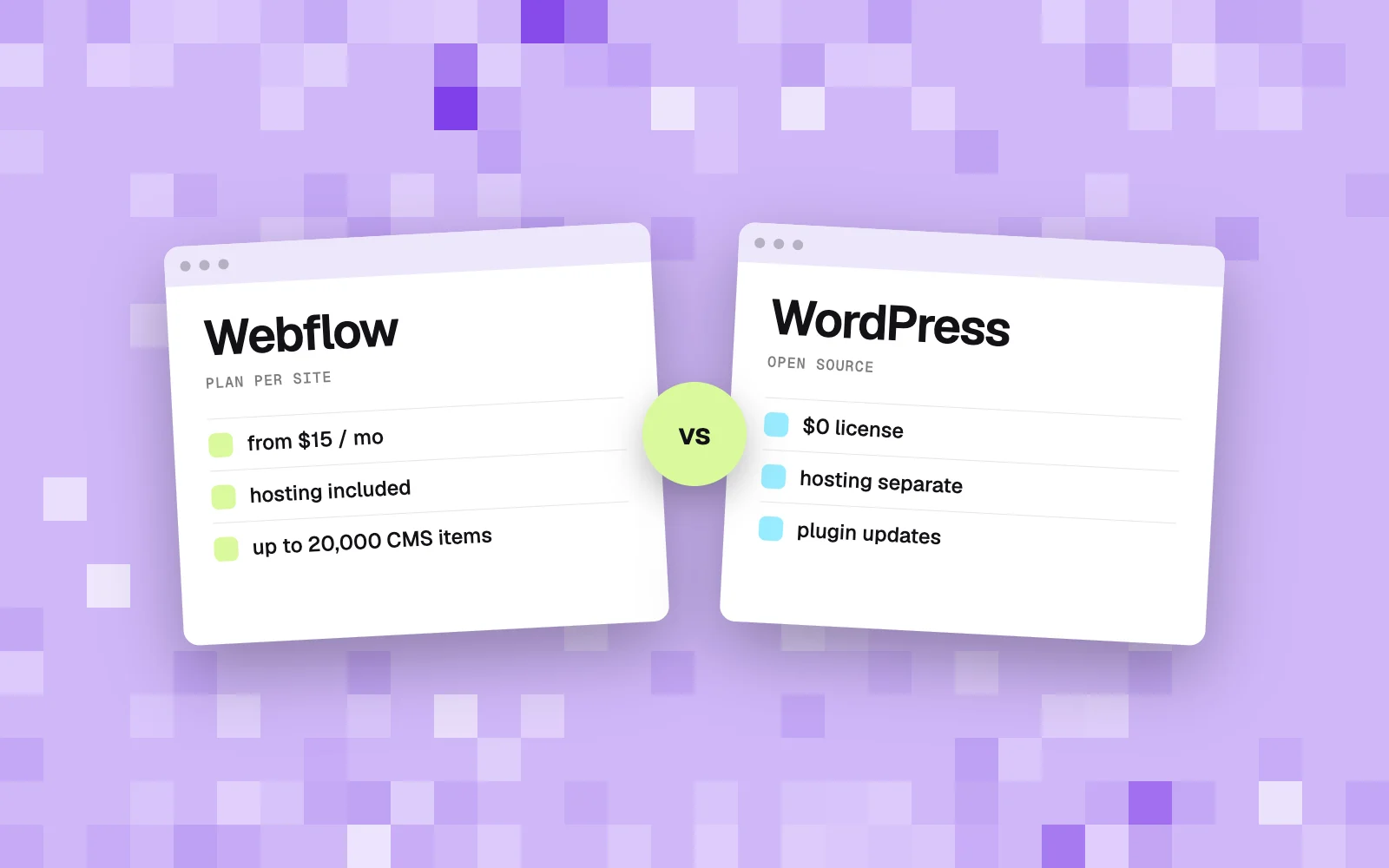
You need a website for your company and you have two proposals on the table. One agency says "WordPress, because everyone uses it", the other says "Webflow, because you don't have to patch it". Both are partly right. Below is a Webflow vs WordPress comparison based on pricing pages and reports from November 2026, not on what a given vendor happens to sell.
While writing it, I went through the six comparisons that currently rank highest on Google. Four of them were written by companies that sell WordPress hosting. Two are translations from 2025 with outdated Webflow plans. None of them calculates the cost over several years, and none explains how to move a site without losing traffic.
One note before we start. I'm Max Miskow, I build websites in Webflow, Framer and in code, and one of my services is migrating from WordPress to Webflow. That's why for every criterion I give a source you can check yourself, and I say plainly when WordPress is the better choice.
Webflow vs WordPress: the short answer
Webflow is a better fit for a business website that your team wants to edit without a developer and that nobody wants to maintain at the server and plugin level. WordPress is a better fit for a large online store, a site with user accounts, and projects that need many add-ons. The difference comes down to who is responsible for maintenance: the platform or you.
On paper, WordPress wins on scale. According to W3Techs, in November 2026 it powers 38.6% of all websites in the world and 57.6% of sites whose CMS can be identified. Webflow, according to the same source, has 0.8% of all websites and 1.2% of the CMS market.
Popularity doesn't tell you which tool will work better for you, though. Mostly it tells you that it's easier to find someone who knows WordPress, and that WordPress is a more frequent target of attacks. I come back to both points below.
How Webflow and WordPress differ
Webflow is a paid platform for designing and hosting websites: the visual editor, the CMS and the servers come in one subscription. WordPress is a free, open source content management system that you install on a hosting provider of your choice and extend with plugins. With Webflow you buy a ready service. With WordPress you assemble it from parts.
WordPress.org describes its own license: it's the GNU General Public License (GPLv2 or later), which lets you use the software for any purpose. So "WordPress is free" is true. You pay for everything around it: hosting, the domain, premium themes and plugins, and the time spent on updates.
With Webflow you pay for a site plan. It includes hosting with a CDN, automatic backups with one-click restore, and platform updates. There are no plugins to patch, because you don't install code on your own server.
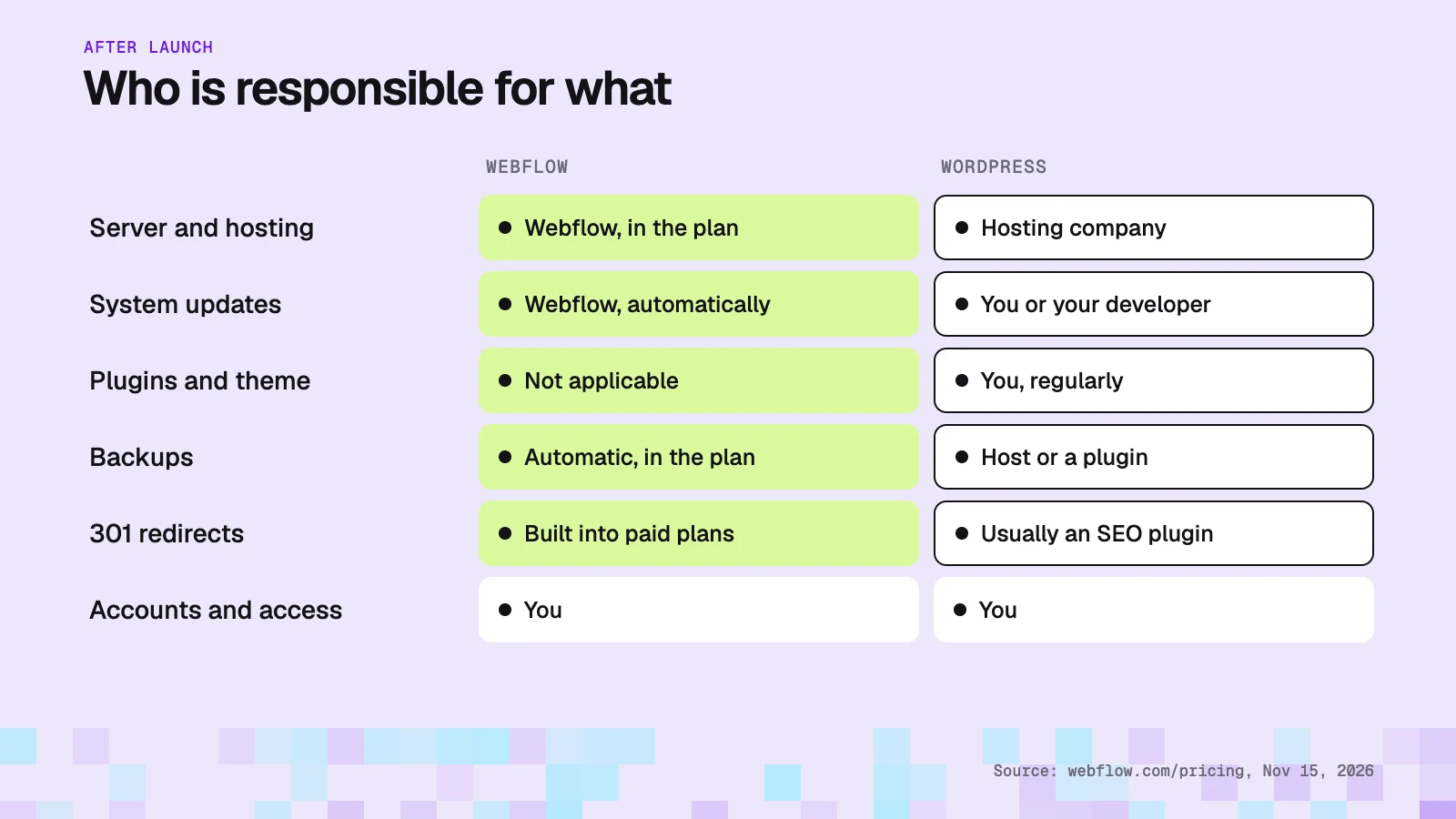
The clearest way to see this is the split of responsibilities. The table shows who looks after what once the site is live.
| Task after launch | Webflow | WordPress |
|---|---|---|
| Server and hosting | Webflow, included in the plan | The hosting company you choose |
| System updates | Webflow, automatically | You or your developer |
| Plugin and theme updates | Not applicable | You or your developer, regularly |
| Backups | Automatic, included in the plan | Depend on the host or a plugin |
| 301 redirects and sitemap | Built into paid plans | Usually through an SEO plugin |
| Accounts and permissions | You | You |
Comparison table: Webflow vs WordPress for a business website
The key differences show up in four places: who pays for maintenance, who is responsible for security, how easy it is to edit content, and how big a store you can build. Webflow prices come from the official pricing page (as of November 15, 2026), vulnerability data from the Patchstack report.
| Criterion | Webflow | WordPress |
|---|---|---|
| License | Paid plan for each site | Free, open source (GPLv2) |
| Hosting | Included in the plan, with CDN | Bought separately from a provider |
| Site without a CMS | Basic: $15/mo, up to 300 static pages | Hosting + domain |
| Site with a blog or portfolio | Premium: $25/mo, up to 20,000 CMS items | Hosting + domain, no post limit |
| Prices | In USD, billed yearly, plus tax | Depend on hosting and plugins |
| Updates and patches | Handled by Webflow | Handled by you or your developer |
| Main security risk | Accounts and permissions | Plugins (91% of new vulnerabilities in 2025) |
| Ecommerce | From $29/mo, 500 products, 2% transaction fee | WooCommerce and other plugins |
| Content editing by the team | On-page editor, no access to the design | Admin panel, depends on the theme |
| When to choose | Business site, landing page, company blog | Large store, user accounts, unusual add-ons |
Two caveats about the table. Webflow prices assume yearly billing and are higher on monthly billing: Webflow says yearly billing saves up to 40%. I deliberately don't turn WordPress costs into a single figure, because hosting prices vary a lot depending on whether it's a shared server or managed hosting with backups and support.
How much Webflow and WordPress cost in 2026
Webflow costs from $15 a month for a site without a CMS to $25 a month for a site with a blog, billed yearly and excluding VAT. WordPress has no license fee, but you pay for hosting, a domain and the time spent on updates. In the long run, maintenance decides the difference, not the plan price.
Webflow plans in numbers
Webflow currently has four plan tiers for a regular site and three for a store. Data from the pricing page as of November 15, 2026, prices billed yearly, in USD, per site, excluding taxes:
| Plan | Monthly price | What you get | Who it's for |
|---|---|---|---|
| Starter | $0 | webflow.io domain, 2 static pages, 50 CMS items | Learning and testing |
| Basic | $15 | Custom domain, 300 static pages, 10 GB bandwidth, no CMS | Brochure site, landing page |
| Premium | $25 | CMS with up to 20,000 items in 40 collections, from 50 GB bandwidth | Business site with a blog or portfolio |
| Team | $2,500, annual contract | Everything in Premium, Webflow Localize with 2 languages, 5 full seats | Large marketing teams |
| Ecommerce Standard | $29 | 500 products, 2% transaction fee, 3 editor accounts | Small store, a few services |
| Ecommerce Plus | $74 | 5,000 products, no transaction fee, 10 accounts | Growing store |
| Ecommerce Advanced | $212 | 15,000 products, no transaction fee, 15 accounts | Larger catalog |
For a typical small business, the real choice is Basic or Premium. The Team plan costs a hundred times more than Premium and only makes sense with a large team and several language versions.
Costs few people mention
With Webflow, a few things only surface after launch. Prices are in dollars, so the amount in your local currency changes with the exchange rate. The Basic plan has no CMS, so a blog or a project list means going straight to Premium.
The least obvious one is bandwidth. Webflow states on its pricing page that two consecutive months over the bandwidth limit trigger an automatic upgrade to a higher plan. You can also buy extra bandwidth: 50 GB more on Premium costs $20 a month billed yearly, or $30 billed monthly. A typical business site rarely hits this, but with large photos and video it's worth checking.
With WordPress the list is different: yearly renewals for premium plugin and theme licenses, backups if your host doesn't run them, and hours spent on updates. Add repairs when updating one plugin breaks another.
3-year cost: the calculation
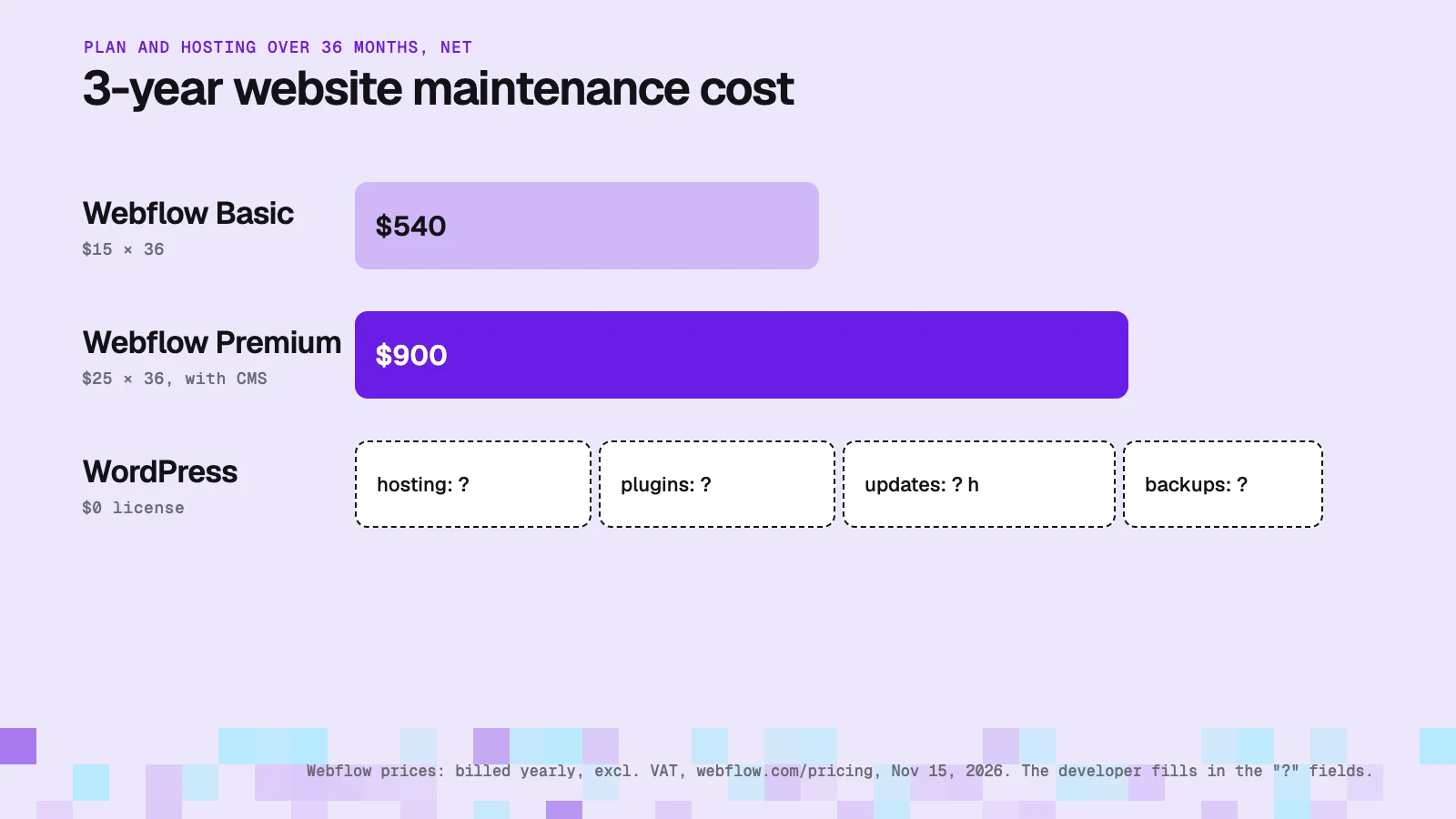
A business site with a blog or a project list usually means the Premium plan. Over 3 years you pay $25 × 36 months, which is $900 net. A site without a CMS on the Basic plan is $15 × 36, which is $540 net. That amount includes hosting, backups and platform updates.
| Item over 3 years | Webflow Basic | Webflow Premium | WordPress |
|---|---|---|---|
| License and hosting | $540 net | $900 net | License $0, hosting per the provider's price list |
| Domain | Separate, from a registrar | Separate, from a registrar | Separate, from a registrar |
| Premium plugins and theme | Not applicable | Not applicable | Per license, usually yearly |
| Updates and patches | Included in the plan | Included in the plan | Your hours or a developer's maintenance |
| Backups | Included in the plan | Included in the plan | Host or a plugin |
Before you sign a contract, ask the developer to fill in the right-hand column with actual amounts. Then you compare two numbers, not "free" with "paid".
How much a website costs on WordPress or on Webflow
The cost of building the site is separate and doesn't depend much on the platform. What decides it is the number of pages, the design, the content and the integrations. A typical business website project with me costs PLN 3,000–15,000 net, in Webflow, Framer or in code. I charge a fixed price per project or by the hour, with no subscription and no monthly minimum.
Security and maintenance: where WordPress needs more work
WordPress needs regular updates, because most vulnerabilities sit in the plugins and themes you install yourself. In Webflow, Webflow patches the server and the platform, and you look after accounts and permissions. For a small business without an IT department, this is often the most important difference in the whole comparison.
Figures from the two latest Patchstack reports (Patchstack collects vulnerability reports across the WordPress ecosystem) show a clear trend:
| Metric | 2024 | 2025 |
|---|---|---|
| New vulnerabilities in the WordPress ecosystem | 7,966 | 11,334 |
| Year-over-year change | +34% | +42% |
| Share in plugins | 96% | 91% |
| Share in themes | 4% | 9% |
| Vulnerabilities in WordPress core | 7 | 6 |
| Unpatched on the day of disclosure | 33% | 46% |
Sources: Patchstack report for 2024 and Patchstack report for 2025.
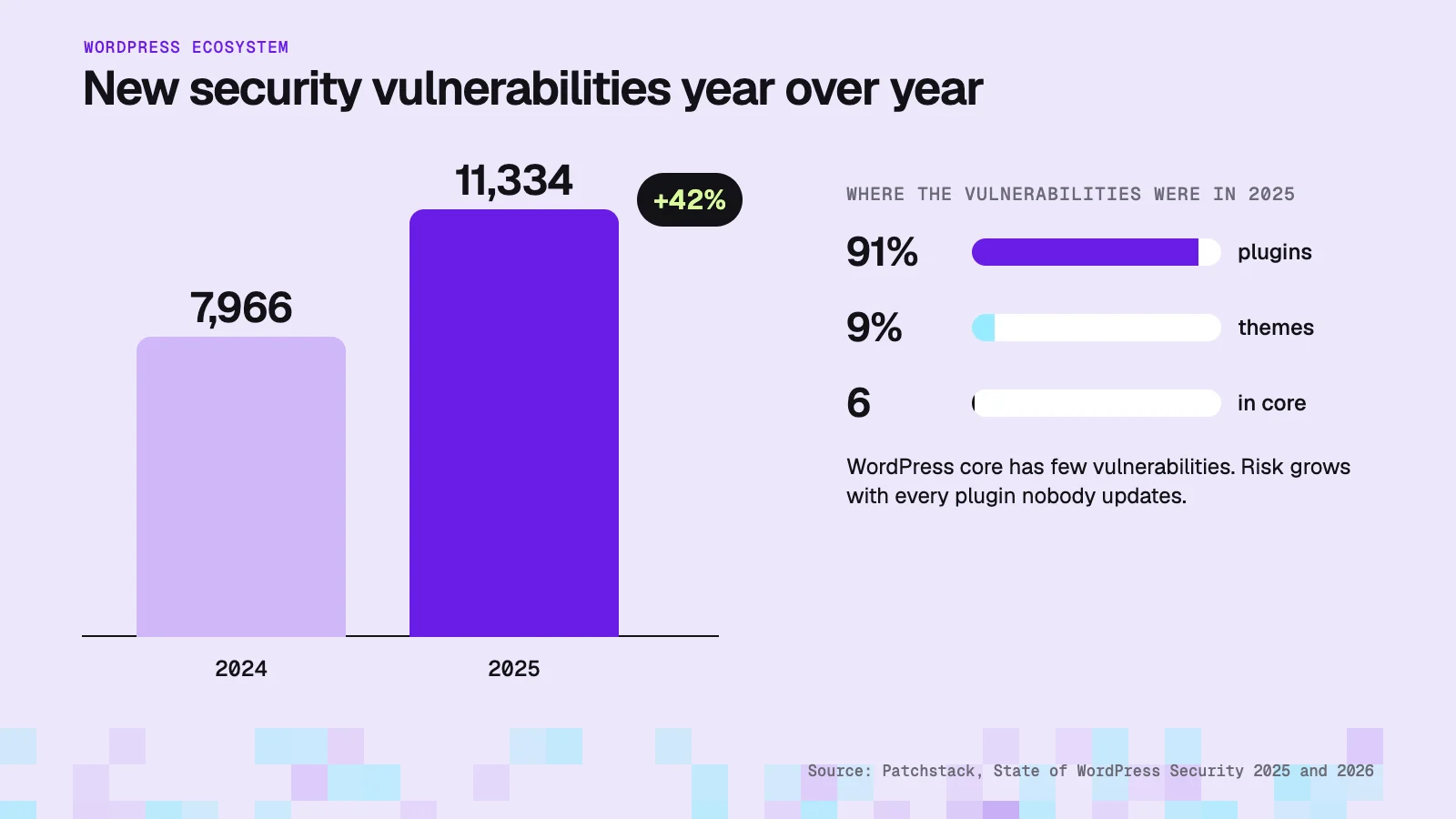
Two figures from the 2025 report matter most for the owner of a small site. The median time from disclosure to mass exploitation of the most heavily attacked vulnerabilities was 5 hours. And 46% of vulnerabilities had no fix on the day they were published. The report also points to premium plugins: fewer researchers review their code, so "paid" doesn't mean "safer".
The conclusion is simple. WordPress itself is well maintained: only 6 vulnerabilities were found in core in 2025, all of them low priority. Risk grows with every plugin nobody updates. A WordPress site therefore needs someone who checks updates every month, makes a backup and tests that the form still works after the update.
Webflow doesn't have this work, but it has another kind: you keep track of who has access to the account and the project. In both cases you can outsource the care of the site. My website maintenance is billed by the hour, with no monthly minimum, and I handle small changes within 2 days.
Webflow CMS vs WordPress: blog, content editing, SEO and ecommerce
For content editing by a marketing team, Webflow CMS comes out ahead, because the editor lets people change copy and add posts without the risk of breaking the layout. In SEO, both platforms give you the same baseline: custom titles, descriptions, redirects and a sitemap. For a large store or a very large content site, WordPress wins.
Blog and content
Webflow CMS is the content database built into Webflow: collections such as blog posts, projects or job openings, with one template for all items. On the Premium plan it holds 20,000 items in 40 collections. For a company blog that adds a few posts a month, that's room for many years.
WordPress started as a blogging system and has no post limit beyond what your hosting can handle. If you run a portal with thousands of articles, several authors and complex categories, WordPress gives you more freedom.
Content editing by the team
In Webflow, a team member adds a post, a project or a job opening in the CMS and never sees the design panel. In WordPress a lot depends on the theme and the page builder plugin. With a well set up theme, editing is simple. With a messy one, every change risks breaking the page.
SEO
Google doesn't favor either platform. What counts is speed, heading structure, content and links. On paid plans, Webflow has 301 redirects, an automatic XML sitemap and canonical URL settings with no add-ons. WordPress usually needs an SEO plugin for this, which gives you more options but also one more plugin to update.
Ecommerce
Webflow has a limit of 500 products on the Standard plan and a 2% transaction fee, and the largest plan holds 15,000 products. If you sell a few services or a few dozen products, that's enough. With a large catalog, many variants and wholesaler integrations, WordPress with WooCommerce gives you more options.
Webflow vs WordPress: which is better for a business
For a service business, a construction company, a consultancy or an expert, Webflow is usually the better choice, because the site has a dozen or so pages, a portfolio and a form, and nobody in the company wants to update plugins. For a store with a large catalog, a content portal or a site with customer accounts, WordPress is better. The table below shows the typical cases.
| Type of business and site | Better choice | Plan or setup | Why |
|---|---|---|---|
| Service business, 5–15 pages, no blog | Webflow | Basic, $15/mo | Lowest maintenance cost, no plugins |
| Construction company with a portfolio | Webflow | Premium, $25/mo | Projects in the CMS, easy editing for the team |
| Expert or consultant with a blog | Webflow | Premium, $25/mo | Blog in the CMS without running a server |
| Store with up to 500 products | Webflow or WordPress | Webflow Standard or WooCommerce | 2% fee in Webflow, more work in WordPress |
| Store with thousands of products | WordPress | WooCommerce on strong hosting | Product limits and integrations |
| Content portal, many authors | WordPress | Managed hosting | No post limit, detailed roles |
| Online courses, customer accounts, forum | WordPress | Course and membership plugins | Ready add-ons Webflow doesn't have |
An example from my projects: the website for the construction company Filjan Bud (case study in Polish) was built in 4 weeks from the first call. It has a form with 5 questions, including scope, budget, timeline and building location. A site like this only needs a simple CMS for projects, and what matters more than the platform is that the form gives the contractor specific inquiries.

When to choose Webflow and when to choose WordPress
Choose Webflow if you're building a business website, a landing page or a company blog, and your team will edit the content without a developer. Choose WordPress if you need a large store, customer accounts, a forum or a specific plugin that Webflow can't replace. If you're undecided, start with a list of features, not with the platform.
Webflow makes sense when:
- the site has up to a few dozen pages and a blog, projects or job openings in the CMS,
- you don't have anyone to update plugins every month,
- you care about polished design and animations,
- you want one bill for hosting and the platform.
WordPress makes sense when:
- you run a store with thousands of products or complex variants,
- you need user accounts, online courses or a forum,
- you already have a team or a company that maintains WordPress and does it well,
- full control over the server and the code matters to you.
WordPress vs Webflow: reviews and the most common objections
A few repeated opinions circulate about both platforms. Some are true, some refer to old versions. I collected the ones that come up most often in the top-ranking comparisons and checked them against current data.
| Opinion | True in 2026? | What the data says |
|---|---|---|
| "WordPress is free" | Partly | The GPLv2 license is free; hosting, plugins and maintenance are not |
| "WordPress is insecure" | Partly | Core had 6 vulnerabilities in 2025; almost all of the 11,334 were in plugins and themes |
| "Webflow is expensive" | Depends on the plan | Basic $15, Premium $25 a month, Team $2,500 |
| "Webflow isn't suitable for a blog" | No | The CMS on Premium holds 20,000 items |
| "Webflow has no add-ons" | Outdated | It has an app marketplace, though much smaller than the WordPress plugin directory |
| "WordPress is better for SEO" | No | Google evaluates the site, not the platform; both have redirects and a sitemap |
To be fair, in the top-ranking comparisons the advantage goes to WordPress more often when the authors sell WordPress hosting. So for every opinion, check who wrote it.
Migrating from WordPress to Webflow: a checklist
Moving from WordPress to Webflow makes sense when the site mainly presents the company and plugin maintenance takes time and money the site doesn't earn back. The most important thing in a migration is keeping your URLs and Google traffic, which means 301 redirects from the old URLs to the new ones. Without them, old URLs in Google results lead to a 404 error.
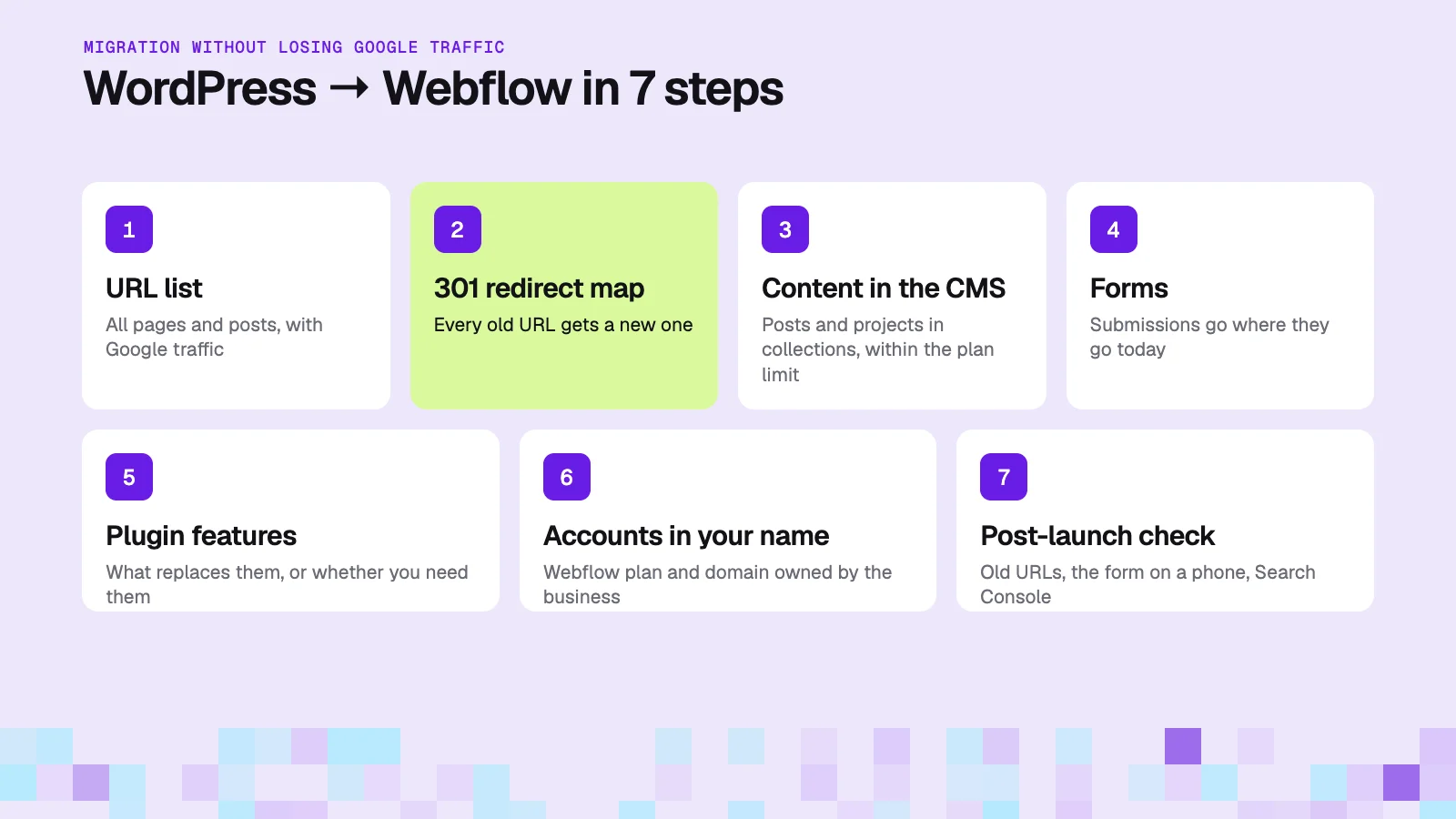
Before you start, go through 7 points:
- URL list. Export all page and post URLs from the old site, including the ones that get traffic from Google.
- Redirect map. For each old URL, enter the new one. 301 redirects are available on every paid Webflow plan.
- Content in the CMS. Move posts and projects into CMS collections. Check that they fit within the plan limit.
- Forms and integrations. Write down where form submissions go today (email, CRM) and recreate that after the migration.
- Plugin features. List your plugins and note for each one what replaces it in Webflow, or whether you still need it.
- Accounts in your name. The Webflow plan and the domain should be on your account, not the developer's.
- Post-launch check. After switching the domain, test a few old URLs, the form on a phone, and Google Search Console.
I describe WordPress to Webflow migrations in more detail on the WordPress to Webflow migration page. With me, the site, the accounts and the code belong to the client, including after the migration.
Frequently asked questions
Is Webflow better than WordPress?
For a typical business website, often yes, because hosting, backups and updates are included in the plan, and the team edits content easily. For a large store, user accounts or projects that need many plugins, WordPress is better. The better tool is the one that matches your site's feature list.
How much does Webflow cost per month?
According to Webflow's pricing page as of November 15, 2026, the Basic plan costs $15 a month and the Premium plan with CMS costs $25 a month, billed yearly and excluding taxes. Ecommerce plans start at $29 a month. On monthly billing, prices are higher.
Is WordPress free?
WordPress itself is: it's licensed under GPLv2 and you can use it for any purpose. You pay for hosting, the domain, premium themes and plugins, and the time spent on updates. That's why you should compare the cost of the whole site over 2 to 3 years, not just the license.
What does WordPress cost for a business?
The WordPress license costs $0. The price of a business website on WordPress is the sum of design and build, hosting, the domain, premium plugins or a theme, and maintenance. Ask the developer to break these items down over 3 years and compare them with the cost of a Webflow plan.
Is WordPress secure?
WordPress core is secure: according to Patchstack, only 6 low-priority vulnerabilities were found in it in 2025. The problem is plugins and themes: of the 11,334 new vulnerabilities, 91% were in plugins and 9% in themes. A WordPress site is secure if someone updates it regularly.
Is a Webflow site worse for SEO?
No. Google doesn't evaluate the platform, it evaluates the site: speed, content, headings and links. On paid plans, Webflow has 301 redirects, an XML sitemap and canonical URLs. WordPress usually does the same through an SEO plugin.
Is Webflow CMS enough for a company blog?
Yes. On the Premium plan, Webflow CMS holds 20,000 items in 40 collections, covering posts, categories, authors and projects. For a blog that publishes a few articles a month, that's room for years. For a portal with thousands of articles and many authors, WordPress is better.
Can you move a site from WordPress to Webflow without losing Google rankings?
Yes, if you set up 301 redirects from all old URLs to the new ones and move the content that gets traffic. After launch, check the old URLs and the reports in Google Search Console. Most lost traffic comes from missed redirects.
If you have two quotes, one for WordPress and one for Webflow, and you want someone to compare them, get in touch. I reply within 1 business day. I can also do a free audit of your current website: a 5–10 minute recording with three things to improve.